
Botika pricing at a glance (checked October 11, 2026)
Botika's pricing page loads its prices with JavaScript, so text scrapers often show placeholder numbers. We read the rendered page in a browser, with both the Monthly and Yearly tabs and every option in the credit drop-down. Prices are in USD.
Swipe the table sideways to see all columns.
| Plan | Billed monthly | Billed annually | What the plan adds |
|---|---|---|---|
| Pro | $55/mo for 50 credits a month (also 100 for $105, 150 for $150) | $46/mo for 600 credits a year (also 1,200 for $88/mo, 1,800 for $125/mo) | No Botika watermark, limited model and background selection, 2K images, video generation |
| Advanced (“Most Popular”) | $120/mo for 100 credits a month (up to 500 for $560) | $100/mo for 1,200 credits a year (up to 6,000 for $467/mo) | All models and backgrounds, 4K images, team collaboration, upload your own footwear for flat lays, custom background colors |
| Enterprise | Custom (book a call) | Custom | Custom AI models and backgrounds for your brand, expert quality control, custom retouching briefs |
Annual plans are labeled “Save 17%” and give you all the year's credits up front. They also add a fix service that monthly plans do not have: 2 retouch rounds per photo on Pro and 3 on Advanced. Botika's FAQ puts fix turnaround at up to 2 business days on Pro and 1 on Advanced.
Credits, cost per photo, and the free trial
What a credit buys: Botika's pricing FAQ says each photo costs 1 credit and each video costs 5. Its own example: 4 photos and 1 video for a product cost 9 credits. To estimate your plan, multiply your SKU count by the photos and videos you show per product.
Swipe the table sideways to see all columns.
| Plan and billing | Price | Credits | Cost per photo |
|---|---|---|---|
| Pro, monthly | $55/mo | 50/mo | $1.10 |
| Pro, annual | $46/mo billed annually | 600/yr | about $0.92 |
| Advanced, monthly | $120/mo | 100/mo | $1.20 |
| Advanced, annual | $100/mo billed annually | 1,200/yr | about $1.00 |
Our arithmetic from the listed prices, entry tier only. A 5-credit video costs five times the per-photo figure. Annual prices include the retouch service; monthly prices do not.
Rollover and expiry: unused credits roll over without limit while your subscription is active. If you cancel, rollover credits expire immediately and the current cycle's credits last until the billing period ends. Botika's FAQ also says you can buy one-off packs of up to 150 credits. (The same FAQ mentions plans from 20 credits a month; the smallest option on the pricing page today is 50.)
Free trial: Botika's help center (article dated February 2024) says you can start a free trial with no credit card and test the platform with 8 free credits. Neither that article nor the pricing page says whether trial images are watermarked; the pricing page lists “No Botika watermarks” as a Pro feature.
Shopify: Botika's FAQ describes prorated upgrades for its Shopify and iOS apps, but when we checked, the Shopify App Store page for “Botika Connector” said the app is not currently available. If you want a Shopify-native install, confirm with Botika first. That listing is also where Shopify merchants' reviews of Botika would normally appear, so if you are looking for Botika AI reviews, ask Botika for references or run the free trial on your own garments; we did not test it.
How Botika works
- Upload clothing photos. Botika's FAQ says phone photos, supplier photos, or even customer photos work, in PNG, JPG, or WEBP. Its products page lists three starting points: flat lays, ghost-mannequin shots (front, back, or side), and existing on-model photos.
- Choose the look. For flat lays and mannequin shots, the FAQ says you choose the model, pose, and background. For an existing on-model photo, the pose and body type stay the same while Botika replaces the person with one of its AI models.
- Wait for processing. Botika says its AI takes about 15 minutes, and it advertises same-day results.
- Request fixes if needed. On annual plans you click “Photo Issue” on an image and Botika retouches it within the plan's rounds and turnaround.
Botika's FAQ is explicit: “We don’t offer the ability to make images from text or custom prompts,” and its AI “can’t create new clothing or generate new models.” You steer the result by choosing from its model, pose, and background options. The Pro plan has a limited selection of models and backgrounds; Advanced unlocks the full library and custom background colors. (Botika's site says 150+ AI models; its general FAQ says over 50, so the number available to you may depend on plan and date.)
Who Botika suits, and its limits
Good fit: clothing brands and resellers who already have flat-lay or mannequin photos, want on-model images without a shoot, and value a human fix service on annual plans.
Limits, from Botika's own FAQ:
- It focuses on clothing only. Accessories “might be removed, slightly changed”, and jewelry, footwear, and cosmetics are not offered (Advanced lets you upload your own footwear to complete a flat-lay outfit).
- Kids' models are not available yet; the pricing page lists kids and youth models as coming soon.
- In the on-model workflow, a photo cropped so tightly that no full figure is detected can be marked unsupported; unsupported photos use no credits. Its safety filter may also flag sheer garments or lingerie by mistake.
- Custom models and backgrounds are listed for Enterprise only.
- Per photo, it costs more than most credit-based tools here, roughly $0.92 to $1.20 at entry tiers, though annual prices include retouching.
Botika alternatives by need
Styled sets with a pose and scene generated per product, and the outfit completed for you
Start with: GreenOnion Fashion
Also consider: FASHN
Separate steps for model, background (library or described in words), outfit completion, and per-image framing and pose; writing is optional. First in all four rounds of our test against FASHN and Botika.
Lowest-cost on-model images from a garment photo, with a text prompt
Start with: FASHN Product to Model
Also consider: Claid AI Fashion
FASHN starts at $19/mo for 200 credits and accepts an optional text or image prompt; only the product photo is required.
A cheaper paid plan, or an app inside Shopify
Start with: Modelia
Also consider: GreenOnion AI Fashion Models app (billed through Shopify)
Modelia Creator is $30/mo for 150 credits (about 50 images) on its website; its Shopify app has a $20 one-time pack of 100 credits. Its free plan is watermarked and for testing only.
On-model images plus background removal and general photo editing
Start with: Photoroom AI Fashion Models
Also consider: Claid
Photoroom's Pro plan ($7.50/mo billed yearly) covers editing and up to 1,600 AI Fashion Models generations a month at 1K.
A done-for-you service with human retouching
Start with: Botika (annual plan)
Also consider: Botika Enterprise
Annual Botika plans include 2–3 retouch rounds per photo; we did not see a comparable fix service on the alternatives' pages we checked.
| If you need… | Start with | Also consider | Why |
|---|---|---|---|
| Styled sets with a pose and scene generated per product, and the outfit completed for you | GreenOnion Fashion | FASHN | Separate steps for model, background (library or described in words), outfit completion, and per-image framing and pose; writing is optional. First in all four rounds of our test against FASHN and Botika. |
| Lowest-cost on-model images from a garment photo, with a text prompt | FASHN Product to Model | Claid AI Fashion | FASHN starts at $19/mo for 200 credits and accepts an optional text or image prompt; only the product photo is required. |
| A cheaper paid plan, or an app inside Shopify | Modelia | GreenOnion AI Fashion Models app (billed through Shopify) | Modelia Creator is $30/mo for 150 credits (about 50 images) on its website; its Shopify app has a $20 one-time pack of 100 credits. Its free plan is watermarked and for testing only. |
| On-model images plus background removal and general photo editing | Photoroom AI Fashion Models | Claid | Photoroom's Pro plan ($7.50/mo billed yearly) covers editing and up to 1,600 AI Fashion Models generations a month at 1K. |
| A done-for-you service with human retouching | Botika (annual plan) | Botika Enterprise | Annual Botika plans include 2–3 retouch rounds per photo; we did not see a comparable fix service on the alternatives' pages we checked. |
The overall category, including tools not covered here, is compared in our AI fashion model generator roundup. This page stays on Botika and its closest alternatives.
Comparison table (checked October 11, 2026)
Swipe the table sideways to see all columns.
| Tool | Entry price | Free option | Garment input | How you direct the shot |
|---|---|---|---|---|
| Botika | $55/mo for 50 credits; $46/mo billed annually for 600/yr | Trial: 8 credits, no card | Flat lay, ghost mannequin, existing on-model photo | Pick model, pose (flat lays), background; FAQ says no text or custom prompts |
| GreenOnion Fashion | $19/mo for 60 credits ($15.20/mo billed yearly); 1 credit = one 2K image | Web: 20 free credits; watermarked previews, downloads need a paid plan. Shopify app: 3-day trial | Up to 5 product photos | Choose or generate a model; background from library, upload, or a written description; AI outfit completion; framing and pose per image |
| FASHN | Basic $19/mo for 200 credits (monthly) | 10 credits for new accounts | Flat lay, ghost mannequin, or on-hanger product photo | Optional text prompt, image prompt, background and face references |
| Modelia | Website: Creator $30/mo for 150 credits (3 per image). Shopify app: Basic $35/mo for 250 | Free Starter plan: watermarked, “not for publishing” | Garments, flat lays, existing images | Virtual models, custom backgrounds, outfit generator (per Shopify listing) |
| Photoroom | Pro $7.50/mo billed yearly | Free plan, personal use only | Flat lay or a photo of someone wearing the product | Pick model, pose, background, orientation |
| Claid | Essentials $15/mo billed monthly ($9/mo billed yearly) for 500 credits | Trial: 50 credits | Flat lay or ghost mannequin | Pick model (incl. kids, plus); short extra-instructions field |
Credits are not comparable across tools: Botika charges 1 credit per photo, GreenOnion 1 per 2K image (2 for 4K), and Claid 4 credits per AI Fashion image at standard quality (10 at 2K, 24 at 4K). FASHN says credit use rises with output count and resolution. Modelia's website charges 3 credits per standard image; its Shopify listing does not state a per-image cost.
Botika vs Modelia
Price: Modelia is cheaper to start. On its website pricing page, Creator is $30 a month for 150 credits with clean 4K output, and a standard image costs 3 credits, so about 50 images (roughly $0.60 each) against Botika's $1.10 on monthly Pro. Higher Modelia tiers (Atelier $109, Brand $385 a month) include all Studio generations with no credit counter. Its free Starter plan (20 credits a month) adds a “Created by Modelia” watermark and is described as “for trying Modelia, not for publishing.” The Shopify app (developer MODELIA INC.) lists different plans: a $20 one-time pack of 100 credits, Basic at $35 a month ($336 a year) for 250 credits, and Pro at $85 a month ($816 a year) for 750; it does not state watermark terms for its free plan.
Workflow: both start from your garment photo. Modelia's listing says it turns flat lays into AI model photos, can adapt an existing image of a single garment, and lists background removal, custom backgrounds, an outfit generator, and fashion video. Botika adds a fix service on annual plans and 4K output on Advanced.
Choose Modelia if you want a lower monthly price or a small one-time pack in Shopify. Choose Botika if you want human-reviewed fixes on an annual plan.
Botika vs Photoroom
Price: Photoroom is far cheaper per image if you only need 1K. Its pricing page lists Pro at $7.50 a month billed yearly, with up to 1,600 AI Fashion Models generations a month at 1K if you spend all your credits on it. 2K starts on Max ($20.99 a month billed yearly, up to 185 at 2K) and 4K on Ultra ($82.50, up to 310). Photoroom says monthly credits can vary by country.
Workflow: Photoroom's AI Fashion Models page asks for a flat lay or a shot of someone wearing the product, then you pick a model, pose, and background. Photoroom is a broad photo editor, so background removal and other edits are in the same app. Botika is narrower and clothing-only; its products page explicitly lists ghost-mannequin input (Photoroom's how-to names flat lays and worn shots), and it includes retouch rounds on annual plans.
Choose Photoroom if you want many quick on-model images plus everyday editing at a low monthly price. Choose Botika if you want 2K output from the entry plan and a service that fixes problem images for you. Photoroom's free plan cannot be used commercially.
GreenOnion Fashion: more control over the shot
GreenOnion
Our pick: per-product poses and scenes, outfit completionPrice: $19/month for 60 credits ($15.20/month billed yearly), $49 for 180, $149 for 600; 20% off yearly. One credit makes one 2K image; 4K uses two. That works out to about $0.25–$0.32 per 2K image on the entry plan. New greenonion.ai accounts get 20 free credits; free results are watermarked previews, and downloading needs a paid plan. The separate AI Fashion Models Shopify app has its own plans, billed through Shopify, and its listing shows a 3-day free trial.
How the Fashion workflow runs: upload up to five product photos and mark one as primary. Then choose a model (pick from the model library, upload your own model photo, or describe one in a sentence), a background (from a Studio White, Studio Color, Indoor, or Outdoor library, from an upload, or by describing the background you want in words), and the outfit. Your product stays in the outfit; you can let the AI complete the rest or pick pieces from the Outfits library. In Setup you choose quality, aspect ratio, and number of images, then set framing (full, upper, or lower body) and pose for each image. The Generate button shows the image count and credits before you spend them. Writing is optional: you can skip the descriptions, or type a word, a sentence, or more and let the AI fill in the rest. The steps are there for control, and you can click through them when you don't need to change anything.
Tested against Botika: in our October 2026 test of one wrap top, GreenOnion placed first in all four rounds. It generated four different poses in one run (sitting, spinning, leaning, crouching), matched the model's light to a palm-street scene, and added sandals and a bag with “Let AI complete the outfit”. Botika's strengths showed too: clean, tagged library models and outfits exactly as planned. Read the full test.
How that differs from Botika: both let you pick a model and background. GreenOnion also lets you describe a background in a sentence, generate a new model, and control the rest of the outfit and per-image framing yourself. Botika does more of the finishing for you: it handles retouch requests by hand on annual plans, which GreenOnion does not offer.
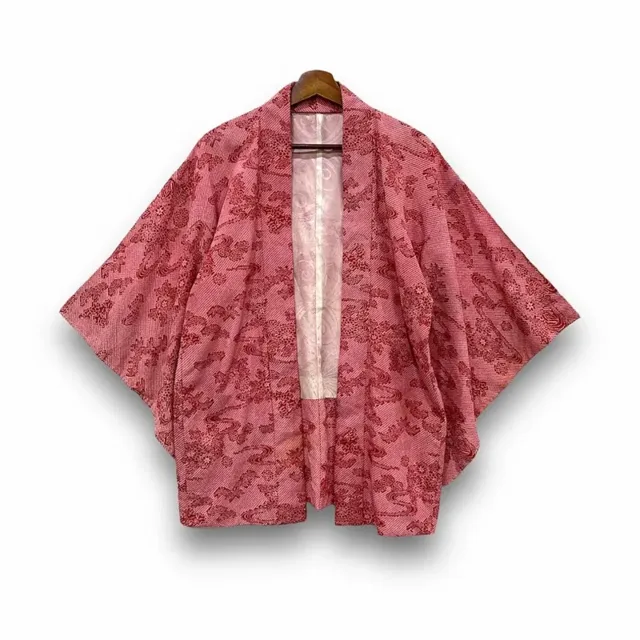
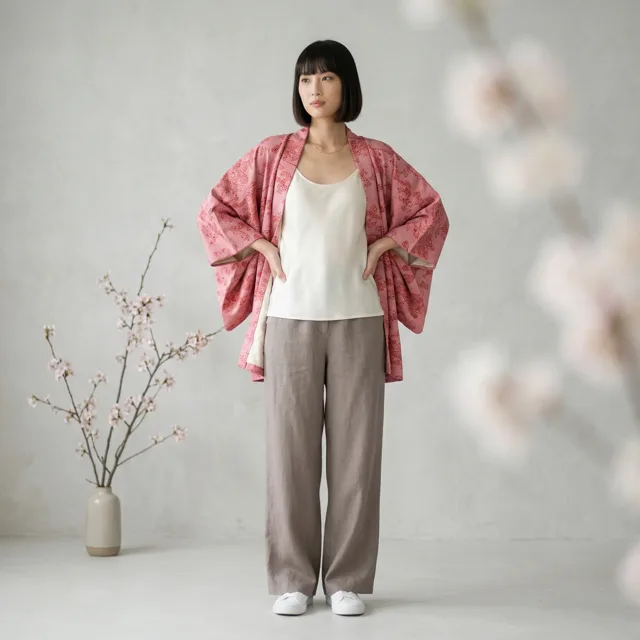
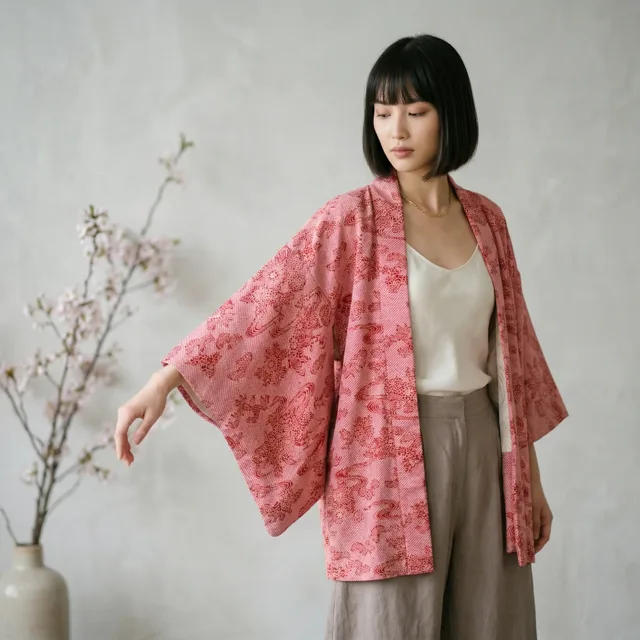

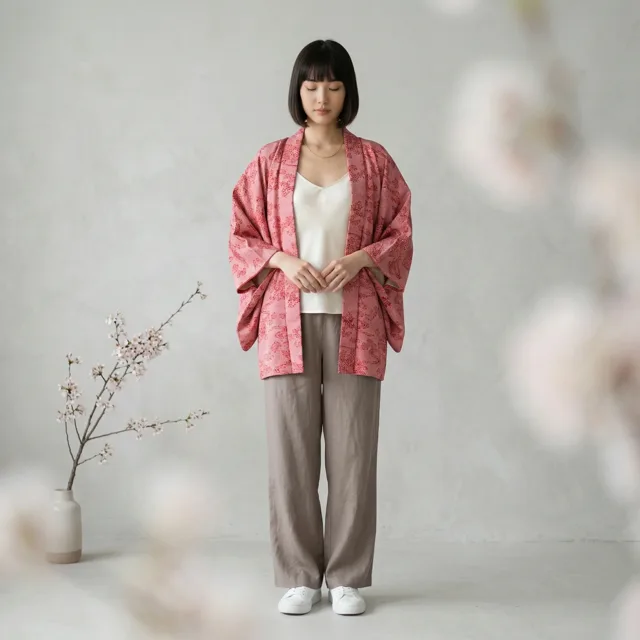
A published GreenOnion example from the Etsy listing workflow, not the Fashion workflow described above: one hanger photo in, four of the set's on-model images shown (the full Etsy set also includes flat-lay and detail shots). The AI added the camisole, linen trousers, sneakers, necklace, and cherry-blossom props. The patterned lining in the input reads as plain cream in the outputs, and the print is redrawn rather than copied exactly, so check pattern placement and lining before you publish.
Strengths
- Separate controls for model, background, outfit, framing, and pose
- Background can be described in words, not only picked from a library
- Lower cost per 2K image than Botika's entry tiers
- Separate Amazon, Etsy, and Shopify workflows when you also need listing images; an AI Fashion Models Shopify app
Limitations
- Free results on the web are watermarked previews; downloading needs a paid plan (the Shopify app lists a 3-day trial)
- No human retouch service; you review and regenerate yourself
- More steps than picking a model and a background, though you can click through them
- AI-added outfit pieces and redrawn prints must be checked against the real garment
Best for: sellers who want to direct the shot and also make listing images. See more AI fashion model examples (including jewelry, which Botika does not support), try the AI fashion model generator, or install the AI Fashion Models Shopify app.
Other Botika alternatives
FASHN
Best low-cost alternative with promptsPrice: Basic $19/mo for 200 credits, Pro $49/mo for 750, Agency $99/mo for 1,500 (monthly billing; yearly saves about two months). New accounts get 10 credits. Top-ups $0.10 per credit. Check current pricing →
FASHN's Product to Model needs only the product image: a flat lay, ghost-mannequin, or on-hanger shot. You can add a text prompt describing the model, pose, background, lighting, and camera style, an image prompt for pose or setting, a background reference, and (depending on plan) a face reference. It combines up to 3 products per generation and makes 1–4 outputs per run at Auto, 1K, 2K, or 4K. Unlike Botika, FASHN lists accessories such as hats, shoes, bags, belts, and eyewear as compatible.
Tradeoff: credit use rises with output count and resolution. FASHN's guide warns that shadows, wrinkles, and cropped edges hurt results, and full-body shots may need prompt detail for footwear and hair. We did not see a done-for-you retouch service on its pricing page.
Modelia
Best lower-cost alternativePrice: Website: Creator $30/mo for 150 credits (3 credits per standard image), Atelier $109/mo, Brand $385/mo; free Starter plan is watermarked and for testing only. Shopify app: $20 one-time for 100 credits, Basic $35/mo ($336/yr) for 250, Pro $85/mo ($816/yr) for 750. Check current pricing →
A Shopify app that puts uploaded garments on virtual models, turns flat lays into model photos, and adapts an existing image of a single garment. The listing also names background removal, custom backgrounds, an outfit generator, and AI fashion video.
Tradeoff: the website and Shopify plans differ, so compare the one you will actually buy. The free plan's images carry a “Created by Modelia” watermark on the website plan, and the Shopify listing does not state its free-plan watermark terms. No retouch service is listed.
Photoroom AI Fashion Models
Best if you also need a photo editorPrice: Pro $7.50/mo, Max $20.99/mo, Ultra $82.50/mo (billed yearly). AI Fashion Models: up to 1,600 generations at 1K on Pro; 2K from Max; 4K on Ultra. Check current pricing →
Upload a flat lay or a photo of someone wearing the product, then pick a model, pose, background, and orientation. Background removal, retouching, and batch editing are in the same app.
Tradeoff: the entry plan is 1K for this feature. The free plan is for personal, non-commercial use only, and monthly credits can vary by country.
Claid AI Fashion
Best for catalog teams and APIsPrice: Essentials $15/mo billed monthly ($9/mo billed yearly) for 500 credits; Pro $49/mo billed monthly ($35/mo billed yearly) for 2,000. AI Fashion: 4 credits standard, 10 at 2K, 24 at 4K. Free trial: 50 credits. Check current pricing →
Claid's AI Fashion Models works best from clear, centered flat lays or ghost-mannequin photos. You pick a pre-generated model (female, male, kids, or plus) or your own model if your plan allows it, add a short instruction such as a studio or outdoor setting, and generate 1–4 images. It adds matching shoes if you do not upload any.
Tradeoff: no separate pose control is described; poses come with each model. Cost per image rises steeply at 2K and 4K.
Pic Copilot and ZMO: check before you switch
Pic Copilot is closing. A service closure notice on its pricing page says it stopped accepting payments from new users on September 27, 2026 and that the website and services close on December 7, 2026 (UTC+8). Active Pro subscribers are being refunded. Do not move a fashion catalog there now.
ZMO: its pricing page would not load for us while we wrote this page, so we don't compare it here. Our AI fashion model generator comparison lists the ZMO free plan we recorded on October 11, 2026; check ZMO's own pricing page before you switch.
Free Botika alternatives
No tool here gives unlimited free commercial images. The free options, as listed on October 11, 2026:
- Modelia: free Starter plan with 20 credits a month on its website, watermarked and “for trying Modelia, not for publishing.” Its Shopify listing shows 50 free credits a month but does not state watermark terms.
- Claid: 50 trial credits, which its pricing page counts as 12 AI Fashion generations.
- FASHN: 10 credits when you sign up.
- GreenOnion: 20 credits when you sign up at greenonion.ai (about 10 to 20 images); free results are watermarked previews, and downloading needs a paid plan.
- Botika itself: 8 trial credits, no card.
- Photoroom: a free plan, but personal, non-commercial use only.
None of these is a free production plan: use them to test your garment, then pay for the images you publish. GreenOnion's free results are watermarked previews; its AI Fashion Models Shopify app lists a 3-day free trial.
How to test before you commit
- Use your hardest garment. Pick one with a busy print, a logo, sheer fabric, or an unusual cut, photographed the way you normally shoot.
- Give every tool the same input. The same flat lay or mannequin photo, and the same request: for example, one full-body studio shot and one upper-body outdoor shot.
- Check the garment, not the model. Print placement, logo spelling, color, length, neckline, sleeves, and anything the AI added (shoes, trousers, jewelry) that you do not sell.
- Count usable images. Divide what you paid by the images you would actually publish. A $1 photo you can use beats three $0.25 photos you cannot.
- Check the plan terms. Billing basis, rollover, commercial use, and, for Botika, whether you need the annual plan's fix service.
Put your garment on an AI model
Upload a product photo, choose or generate a model, describe or pick a background, and set framing and pose for each image, or click through the suggestions, before you generate. New accounts start with 20 free credits.
Try the AI fashion model generatorFrequently asked questions
How much does Botika cost?
Botika Pro is $55 a month for 50 credits billed monthly, or $46 a month billed annually for 600 credits a year. Advanced is $120 a month for 100 credits, or $100 a month billed annually for 1,200 credits a year. Enterprise is custom. One photo costs 1 credit and one video costs 5. Checked on Botika's pricing page on October 11, 2026.
Does Botika have a free trial?
Yes. Botika's help center says you can start a free trial with no credit card and test the web platform with 8 free credits. That is about 8 photos, or one video plus 3 photos. Botika does not say on that page whether trial images carry a watermark.
What is the best Botika alternative?
GreenOnion Fashion is our pick for styled on-model sets: it generates a pose and a scene for each product and can complete the outfit around the piece you sell. In our own October 2026 test of one wrap top, it placed first in all four rounds (model, outfit, pose, background), Botika placed second in the outfit round, and FASHN placed second in the other three. For a fast, low-cost single shot, use FASHN; for a cheaper plan or a Shopify app, Modelia. Stay with Botika if you want human retouching on an annual plan. We make GreenOnion.
Is there a free Botika alternative?
Only for testing. Modelia's website describes its free Starter plan (20 credits a month, 3 credits per standard image) as watermarked and "for trying Modelia, not for publishing." FASHN gives new accounts 10 credits, GreenOnion gives new greenonion.ai accounts 20 credits (free results are watermarked previews; downloading needs a paid plan), and Claid's free trial has 50 credits, which its pricing page counts as 12 AI Fashion generations. Photoroom has a free plan, but its help center says free accounts are for personal, non-commercial use only. Botika's own trial gives 8 credits.
Is Botika or Modelia cheaper?
Usually Modelia. On its website, Modelia Creator is $30 a month for 150 credits, and a standard image costs 3 credits, so about 50 images, or roughly $0.60 each. Botika starts at $55 a month for 50 photos ($1.10 each). Modelia's Shopify app lists different plans (Basic $35 a month for 250 credits). Botika's annual plans include human retouching, which Modelia does not list.
Can Botika do jewelry, shoes, or kids' clothing?
Not officially. Botika's FAQ says it focuses on clothing only, that accessories may be removed or slightly changed, and that kids' models are not available yet (the pricing page lists kids and youth models as coming soon). The Advanced plan lets you upload your own footwear to complete flat-lay outfits.
Did you test Botika's image quality?
Yes, on one garment. In our October 2026 test of one wrap top through FASHN, Botika, and GreenOnion, Botika's library models looked clean and its outfits came out exactly as planned, but almost every full-body pose in its gallery is a small variation on standing, though it got both poses we picked right, and its preset palm-street background looked studio-lit. It placed second in the outfit round and third in the model, pose, and background rounds. GreenOnion ran the test; the full write-up is linked on this page. Botika plan facts on this page come from its pricing page and help center.
Vendor sources checked October 11, 2026
Plans, credits, and regional prices change. Verify the current vendor page before buying.
- Botika pricing (plans, credit tiers, pricing FAQ)
- Botika products page
- Botika FAQs
- Botika help: Do you offer a free trial?
- Botika help: Pricing & Billing
- Botika Connector on the Shopify App Store
- FASHN pricing
- FASHN help: Product to Model
- Modelia pricing (website)
- Modelia on the Shopify App Store
- Photoroom pricing
- Photoroom AI Fashion Models (Virtual Model)
- Photoroom help: Is the app free?
- Claid pricing
- Claid help: how credits work
- Claid help: AI Fashion Models
- Pic Copilot pricing and service closure notice
- GreenOnion AI Fashion Models on the Shopify App Store