
Quick answer: pick the tool by what you need
A styled set from one garment photo, with a different pose and scene in every shot
Start with: GreenOnion Fashion
Also consider: Photoroom AI Fashion Models, Botika
GreenOnion generates each pose and each scene for the product instead of applying a fixed template, so a set of four reads as one shoot. It placed first in the pose and background rounds of our October 2026 test against FASHN and Botika.
Completing the outfit when you only sell one piece
Start with: GreenOnion Fashion
Also consider: Botika (you pick every piece), Claid (preset items)
Turn on “Let AI complete the outfit” and GreenOnion adds the bottoms, shoes, and bag that suit your piece; it placed first in the outfit round of our test. Botika gives exact control but makes you supply a bottom and shoes yourself.
The lowest cost per image for a large catalog
Start with: FASHN Product to Model
Also consider: Claid AI Fashion
FASHN's Basic plan is $19/month for 200 credits, and a 1K or 2K image in Fast mode costs 1 credit. Claid's pricing page lists 4 credits per standard AI Fashion image on a $15/month, 500-credit plan, but when we ran it on October 23 each run cost 10 credits for 1 to 4 images, so your cost depends on how many images you take per run.
A cheap entry plan if you already edit photos in one app
Start with: Photoroom AI Fashion Models
Also consider: Pixelcut On Model
Photoroom Pro ($7.50/month billed yearly) allows up to 1,600 AI Fashion Model generations a month at 1K, alongside background removal and batch tools.
Ghost mannequin, flat lay, and hanger shots in bulk
Start with: Botika
Also consider: FASHN, Claid
Botika's site names flat lays, hangers, and ghost mannequin shots as inputs and lists 150+ AI models (all of them on the Advanced plan). FASHN and Claid document flat lay and ghost mannequin inputs.
Trying a tool for free before paying
Start with: Claid (50 trial credits) or FASHN (10 free credits)
Also consider: Modelia Starter, ZMO Free, GreenOnion (20 free credits, watermarked previews)
These give a few real generations. Most free tiers watermark, cap resolution, or exclude commercial use, so treat them as tests, not production.
| If you need… | Start with | Also consider | Why |
|---|---|---|---|
| A styled set from one garment photo, with a different pose and scene in every shot | GreenOnion Fashion | Photoroom AI Fashion Models, Botika | GreenOnion generates each pose and each scene for the product instead of applying a fixed template, so a set of four reads as one shoot. It placed first in the pose and background rounds of our October 2026 test against FASHN and Botika. |
| Completing the outfit when you only sell one piece | GreenOnion Fashion | Botika (you pick every piece), Claid (preset items) | Turn on “Let AI complete the outfit” and GreenOnion adds the bottoms, shoes, and bag that suit your piece; it placed first in the outfit round of our test. Botika gives exact control but makes you supply a bottom and shoes yourself. |
| The lowest cost per image for a large catalog | FASHN Product to Model | Claid AI Fashion | FASHN's Basic plan is $19/month for 200 credits, and a 1K or 2K image in Fast mode costs 1 credit. Claid's pricing page lists 4 credits per standard AI Fashion image on a $15/month, 500-credit plan, but when we ran it on October 23 each run cost 10 credits for 1 to 4 images, so your cost depends on how many images you take per run. |
| A cheap entry plan if you already edit photos in one app | Photoroom AI Fashion Models | Pixelcut On Model | Photoroom Pro ($7.50/month billed yearly) allows up to 1,600 AI Fashion Model generations a month at 1K, alongside background removal and batch tools. |
| Ghost mannequin, flat lay, and hanger shots in bulk | Botika | FASHN, Claid | Botika's site names flat lays, hangers, and ghost mannequin shots as inputs and lists 150+ AI models (all of them on the Advanced plan). FASHN and Claid document flat lay and ghost mannequin inputs. |
| Trying a tool for free before paying | Claid (50 trial credits) or FASHN (10 free credits) | Modelia Starter, ZMO Free, GreenOnion (20 free credits, watermarked previews) | These give a few real generations. Most free tiers watermark, cap resolution, or exclude commercial use, so treat them as tests, not production. |
What “AI model generator” means here. This page covers tools that put your real clothing on an AI-generated person for product photos, also called AI clothing model generators, AI mannequin generators, or AI model photoshoots. Some “AI mannequin” tools do the reverse and turn flat lay or hanger photos into invisible-mannequin shots, such as Photoroom's AI Ghost Mannequin; see ghost mannequin vs AI models for that choice. The phrase “AI model generator” also brings up 3D model generators and machine-learning model tools, which are not covered here.
How much does AI fashion model generation cost?
Based on US prices checked October 11, 2026, entry paid plans in this comparison range from $8 to $59 a month. Where the vendor publishes enough quota data, listed or calculated output costs range from about $0.10 per FASHN Fast-mode image to $1.97 per ZMO standard-definition image. That is generation cost, not cost per image you can publish: rerolls, retouching and your review time raise the real number.
Swipe the table sideways to see all columns.
| Production need | Cost reference | What changes the real cost |
|---|---|---|
| Low-cost single images | FASHN: about $0.10 in Fast mode | Quality mode, 4K and face references use more credits |
| Styled 2K image sets | GreenOnion: about $0.32 monthly or $0.25 billed yearly | 4K uses two credits; free results are watermarked previews |
| On-model images inside an editor | Photoroom Pro: $7.50/mo billed yearly | The plan allowance is not the same as usable outputs; 2K needs Max |
| Catalog or API-oriented work | Claid: about $0.12 listed; $0.075–$0.30 in our runs | The app charged per run of 1–4 images, so taking one output costs more |
| Curated model library and bulk workflows | Botika: about $0.92–$1.10 per photo | Yearly plans and included retouch rounds change the effective cost |
Use the full comparison below for resolution, licensing and input requirements. A cheaper generation is not cheaper if the plan cannot be used commercially or the garment needs repeated correction.
Comparison table (prices checked October 11, 2026)
Swipe the table sideways to see all columns.
| Tool | Garment photo it asks for | Model and pose control | Free option | Entry paid plan | Approx. price per image |
|---|---|---|---|---|---|
| GreenOnion Fashion | Up to 5 product photos (1 primary) | Saved, newly generated, or uploaded model; Full/Upper/Lower body framing and pose per image | 20 free credits at greenonion.ai; free results are watermarked previews, and downloading needs a paid plan. The Shopify app lists a 3-day free trial | $19/mo for 60 credits ($15.20/mo billed yearly) | About $0.32 per 2K image ($0.25 billed yearly); 4K uses 2 credits |
| FASHN Product to Model | Flat lay, ghost mannequin, or on-hanger photo; up to 3 products per run | Text or image prompt; optional face reference (+2 credits) | 10 free credits for new accounts | Basic $19/mo (monthly) for 200 credits | About $0.10 (1 credit) in Fast mode; 4K Quality is 3 credits |
| Photoroom AI Fashion Models | Sharp photo of the whole garment (flat lay recommended); up to 4 items | 20 preset models (counted in the app Oct 23) or upload your own; 12 preset poses; backgrounds | Free plan is for personal, non-commercial use only | Pro $7.50/mo billed yearly | Up to 1,600 generations/mo at 1K on Pro; 2K needs Max ($20.99/mo billed yearly) |
| Botika | Flat lay, hanger, ghost mannequin, existing product photos | 150+ AI models in the library (a limited set on Pro, all on Advanced); backgrounds | Free trial: 8 credits per help center (Feb 2024); our new account on Oct 23 showed 20 | Pro $55/mo for 50 credits (monthly), or $46/mo billed yearly for 600 credits/year | About $1.10 per photo monthly, $0.92 billed yearly (1 credit per photo, 5 per video) |
| Claid AI Fashion | Flat lay or ghost mannequin; existing on-model images | 100+ AI models or upload your own; 8 preset poses | Trial: 50 credits (12 AI Fashion generations, per the pricing table) | Essentials $15/mo for 500 credits, billed monthly ($9/mo billed yearly); up to 2K | Pricing page: 4 credits per standard image (about $0.12 on Essentials). In the app on Oct 23: 10 credits per run of 1–4 images (about $0.075–$0.30 each). 4K needs Pro ($49/mo for 2,000 credits) |
| Modelia | Flat-lay apparel photos; Mannequin to Model tool listed | Multiple poses from one image; Consistent Character tool | Starter: 20 credits/mo, watermarked, up to 2K, “not for publishing” | Creator $30/mo for 150 credits | 3 credits per image (about $0.60) |
| Flair | Clothing or jewelry product images | AI Human Builder (hair, body type, more) | 5 free images; commercial license from Pro+ | Pro $8/mo; Pro+ $26/mo for 80 images | About $0.33 on Pro+ |
| Pixelcut On Model | One product photo (JPG, PNG, HEIC) | AI model or ready-made persona | Free plan exports without watermark; no AI credits or commercial license listed | Pro $8/mo billed yearly ($10 monthly), 600 AI credits | Not stated per image |
| ZMO.ai | Not stated on the pages we opened | 3 to 80 library models by plan; customization on paid plans | 10 starting credits, 3 models, no card | Basic $59/mo for 30 credits (or $49/mo, likely billed yearly) | About $1.63–$1.97 per standard-definition image |
Prices are in US dollars as shown on vendor pages. “Price per image” is the plan price divided by the images its credits buy at the stated setting. It ignores rerolls, so your real cost per usable image will be higher on every tool. Where a vendor shows two unlabeled prices, we say so rather than guess.
How the workflow differs: from garment photo to model image
Every tool here starts from a photo of your garment, but they differ in what you must decide before generating. That changes how much control you have and how much time each image takes.
Swipe the table sideways to see all columns.
| Tool | Required | Optional controls | How you revise |
|---|---|---|---|
| FASHN Product to Model | One product image | Text prompt (model, pose, background, lighting), image prompt, background reference, face reference, aspect ratio, 1K–4K | Change prompts or references and rerun; 1–4 outputs per run |
| Photoroom AI Fashion Models | At least one source image | Preset or custom model, pose list, background theme or custom background, prompt for pose or crop, quality | Adjust settings and regenerate; batch the same model and settings across up to 250 images |
| Claid AI Fashion | Flat lay or ghost mannequin photo | Model from 100+ or your own, 8 preset poses, prompt for scene (plain studio background by default) | Change model, pose, or prompt and rerun |
| GreenOnion Fashion | Product photo (up to 5), then model, background, outfit, and setup steps; writing is optional | “Let AI complete the outfit”, scene backgrounds from the library or your own words, per-image framing and generated poses, Product Video | Edit, Generate More, or edit a single image (remove object, regenerate, resize) |
The trade-off. FASHN can run on the product image alone, and the text prompt is optional, so it is the fastest path when you are happy to let the AI pick the model and scene. Photoroom, Claid, and GreenOnion ask you to choose a model and pose, which makes a series easier to keep on-brand. GreenOnion adds an outfit step and a per-image framing choice, which suits sets where one dress needs full-body and upper-body shots with a different pose in each. Those steps are there for control; you don't have to write anything, and you can click through them when you don't need to change the suggestions. None of these tools guarantees the same face or fit in every image, so check each one.
The tools, reviewed
How we checked. Prices and plan details were read on vendor pages on October 11, 2026. On October 23 we opened the fashion workflows of Photoroom, FASHN, Botika, Claid, and Flair, and ran generations in FASHN (5 images), Botika (5), and Claid (2 runs). Photoroom asks for a paid plan before generating, and Flair's runs failed, so we have no output from either. Modelia, Pixelcut, and ZMO were checked on their websites only. We make GreenOnion. It is listed first because it is our pick for styled on-model sets and placed first in all four rounds of our own test; the order of the other eight is not a ranking.
1. GreenOnion Fashion
Our pick: per-product poses and scenes, outfit completionPrice: $19/month for 60 credits ($15.20/month billed yearly), $49 for 180, $149 for 600; 20% off yearly. One credit makes one 2K image; 4K uses two. New accounts get 20 free credits; free results are watermarked previews, and downloading needs a paid plan.
Tested: first in all four rounds. In our October 2026 test, we put one wrap top on a hanger through FASHN, Botika, and GreenOnion, one try per image. GreenOnion placed first on model choice, outfit, pose, and background. FASHN was the fast, cheap pick for one shot; Botika had clean library models and full outfit control. GreenOnion ran the test and chose the rounds, so read the conditions in the full write-up or watch the video.
- Best for poses generated per product: four different poses from one run (sitting, spinning, leaning, crouching) with the same model, outfit, and pool. Round 3
- Best for scenes generated per product: on the same typed palm-street scene, the light and shadows on the model matched the setting. Round 4
- Best for outfit completion: from one top and a skirt, it added strappy sandals and a cream bag. Round 2
How it works: The Fashion workflow runs in six steps. (1) Upload up to five product photos, one marked primary, with an optional product description. (2) Pick a model: pick one from the model library, upload your own model photo, or describe a model in a sentence and generate it. (3) Choose a background from the library (Studio White, Studio Color, Indoor, Outdoor), upload one, or describe one in your own words. (4) Set the outfit: your product stays in “Current outfit”, and you can let the AI complete the rest of the look or pick pieces from the Outfits library. (5) In setup, choose quality, aspect ratio, and image count, and for each image pick Full body, Upper body, or Lower body, adjust the framing box, and set the pose. (6) The Generate button shows the image count and credits before you spend anything. Writing is optional throughout: the descriptions and the background prompt can be left out, or you can type a word, a sentence, or more and let the AI fill in the rest. The steps are there for control, so you can adjust each one or click through.
Separate AI Models, Backgrounds, and Outfits libraries let you reuse a person, a set, or styling pieces. When you create a model you can set gender, ethnicity, age, skin tone, body type, hair, and more, or leave fields for the AI to decide. The libraries are optional controls, not fixed templates. A reusable model does not guarantee an identical face in every image, so check consistency across the set.
Shopify: GreenOnion also runs the AI Fashion Models Shopify app. Its listing says it creates sets of four images, offers full-body, half-body, and detail framing, and can publish results to a Shopify product listing. The app has its own plans billed through Shopify every 30 days (listed at $19/month for 120 credits, $49 for 360, and $149 for 1,200), each with a 3-day free trial.
What GreenOnion does differently. Five things stand out in the Fashion workflow; where another tool does part of it, we say so:
- One toggle completes the whole look. Upload only the piece you sell and turn on “Let AI complete the outfit”: GreenOnion adds the bottoms, shoes, bag, and jewelry that suit it, and you can lock specific pieces from the Outfits library instead. In the emerald dress example below, the heels and jewelry were added this way. Other tools fill some of the gap: in our October 23 tests, Claid and FASHN both added bottoms on their own, Claid's outfit step offers a short row of preset tops and bottoms and generates shoes if you upload none, and Botika has Top, Bottom, and Footwear slots you fill from its library. Photoroom combines up to four items you upload. What we did not see elsewhere was bag and jewelry styling from one switch.
- Backgrounds are scenes, not backdrops. A background you pick is treated as a place, so each shot is rendered from its own camera angle, distance, and light, the way a photographer moves around a real location. In the emerald dress example below, the two Rome terrace shots see the dome and the balustrade from different angles, as two frames from one location would. Tools that take the scene only as text, like Claid's fashion flow, generate a new place each time; the test that matters is what a tool does with a background image you pick or upload, so try the same backdrop for several shots and see whether the angle changes or the picture just sits behind the model.
- Poses are set per shot and generated for the scene. In setup, each image gets a pose: let the AI decide, pick a direction (front, three-quarter, side profile, back, walking, sitting, leaning, over the shoulder), or describe your own in a few words (“walking toward the camera, glancing to the side”). GreenOnion then generates the pose to fit the model, outfit, and scene, so a set of four looks like four moments of one shoot. Compare that with what we saw when we opened the other tools on October 23: Photoroom's pose picker is 12 preset poses shown as wooden-mannequin thumbnails (Standing, 3/4 Turn, Power Stance, Walking Forward, Back, Over-the-Shoulder, Seated Casual, and more); in Claid, the pose is chosen by picking one of a few preset photos of the selected library model (front, walking, back, and so on); FASHN has a pose library, but almost all of it is paid, so on the free plan the pose comes from your prompt; Flair's on-model workflow likewise takes the pose from its scene description.
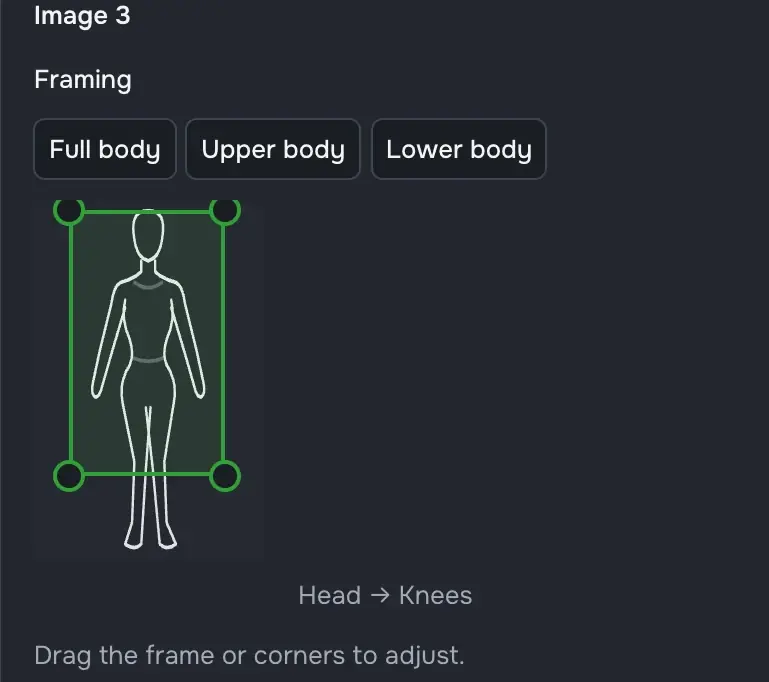
- You frame exactly how much of the model each image shows. In setup, each image has a body outline with a frame you drag: head to feet, head to hips, head to knees, or just the face, and the shot is generated at that crop. Full body, Upper body, and Lower body buttons are one-click starting points. On the pages we checked, the other tools handle framing with preset crops or prompt text, or don't document it.
- The same project becomes a fashion video. GreenOnion's Product Video workflow turns the product and model into a short video of the model wearing it, so photos and video come from one place. Botika also makes short videos from a single photo; most of the other tools are image-only.
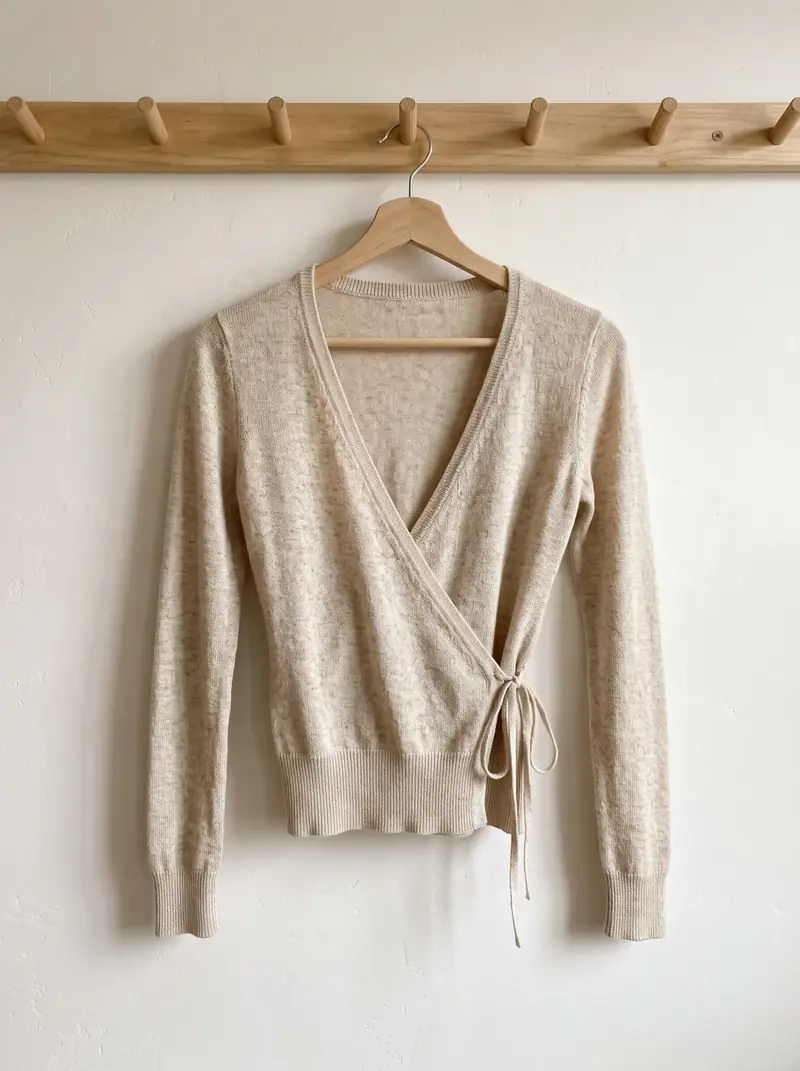
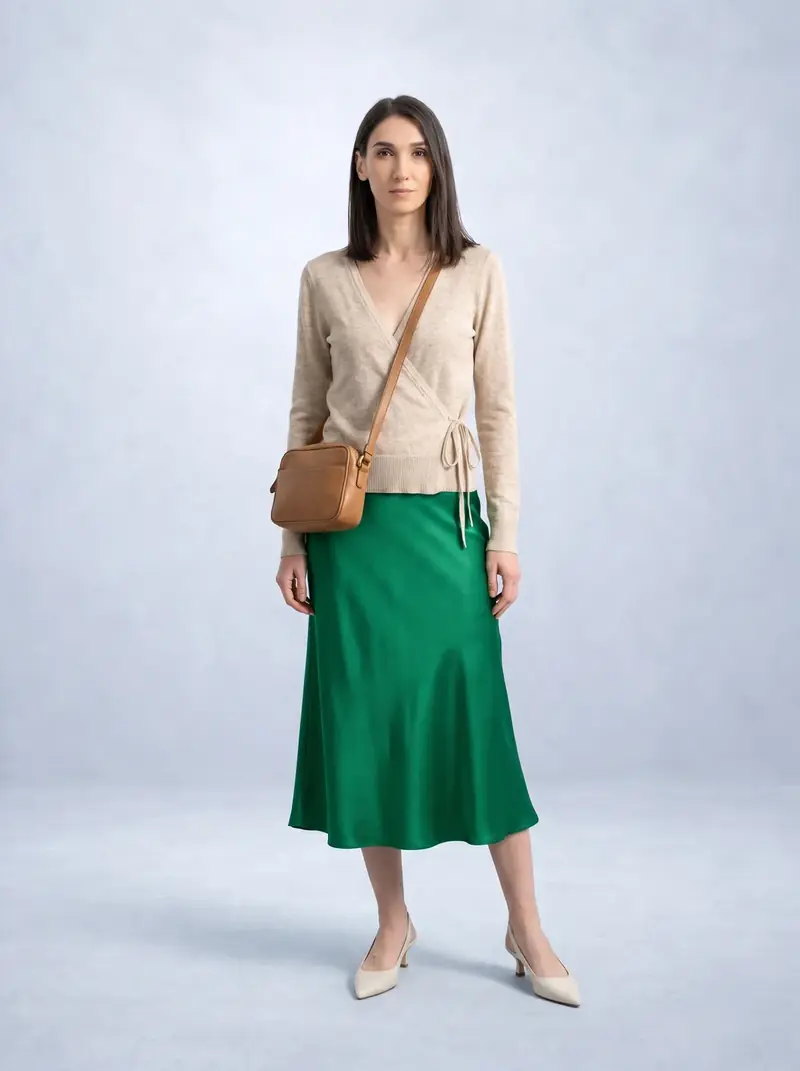
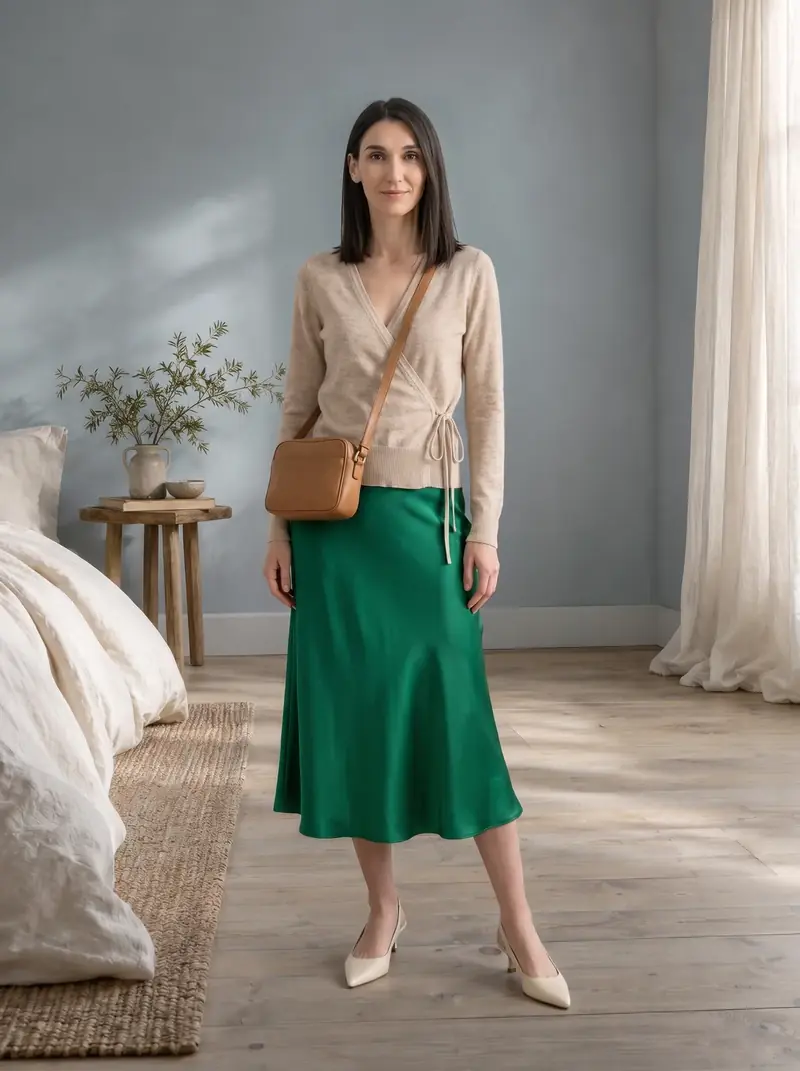
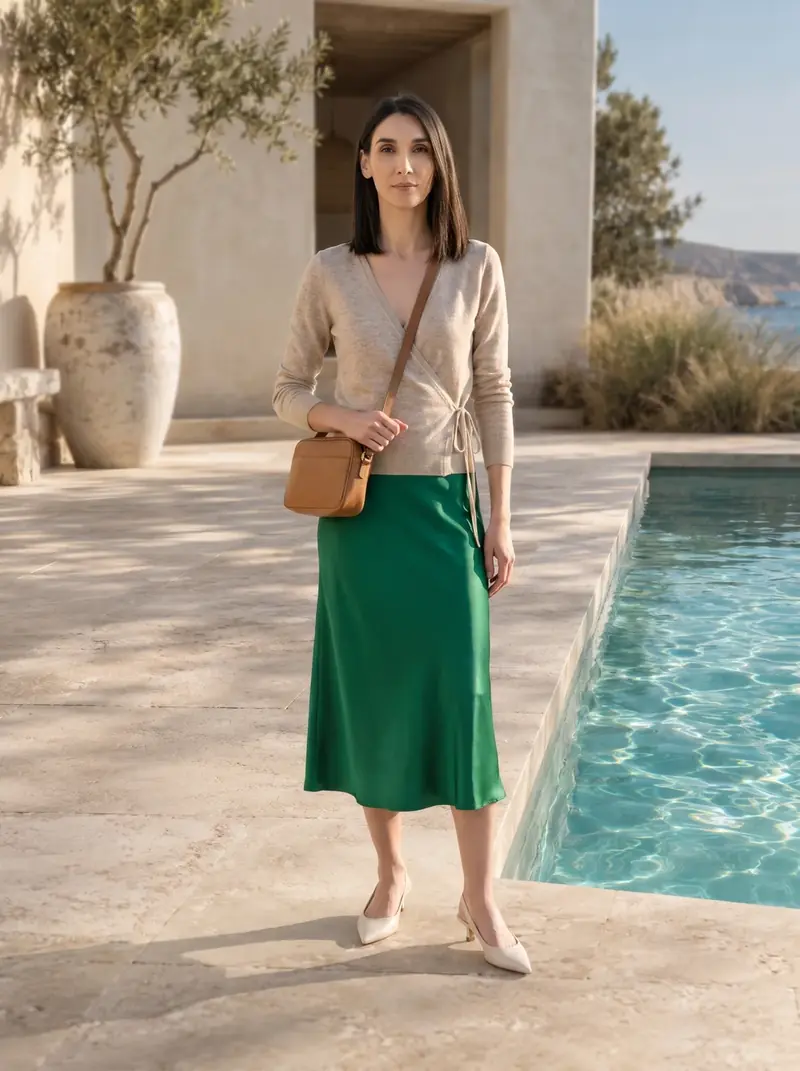
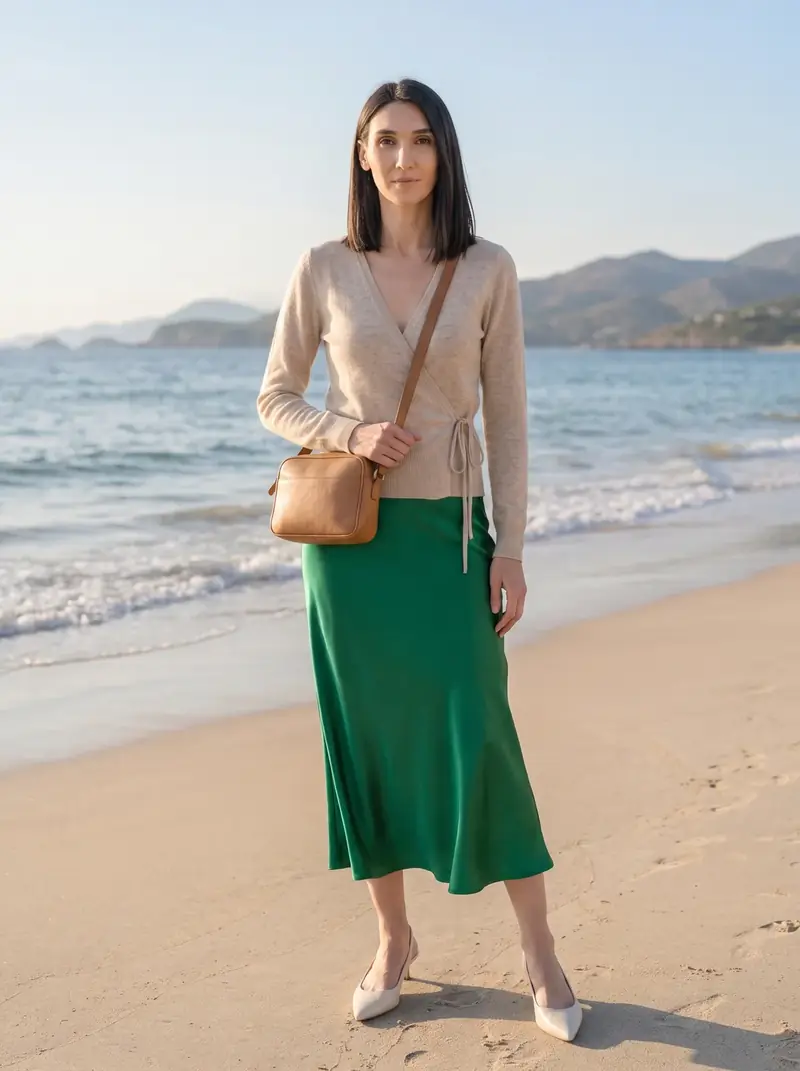
Same knit wrap top, four backgrounds: studio, a bedroom, a poolside terrace, and a beach. The garment, model, and outfit stay fixed; only the background choice changes, and the camera angle and light change with it. The top is a demo product we created for this test, and the outfit (skirt, bag, shoes) was set once and kept the same across the four runs.
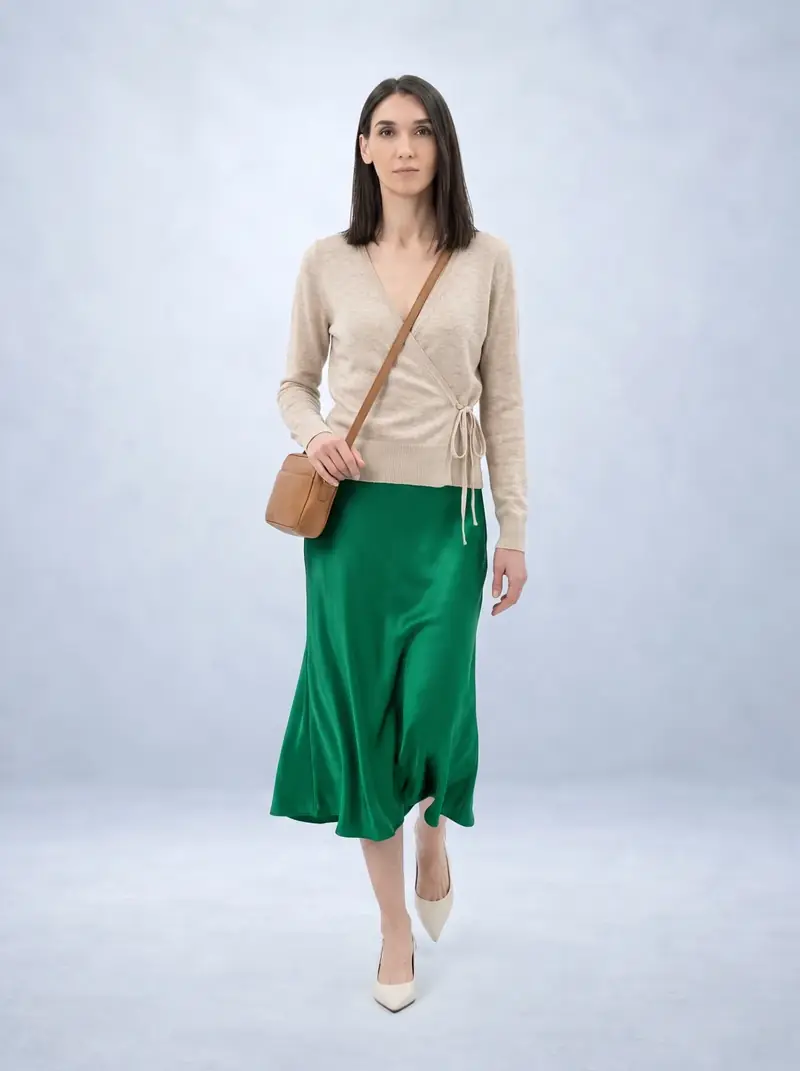
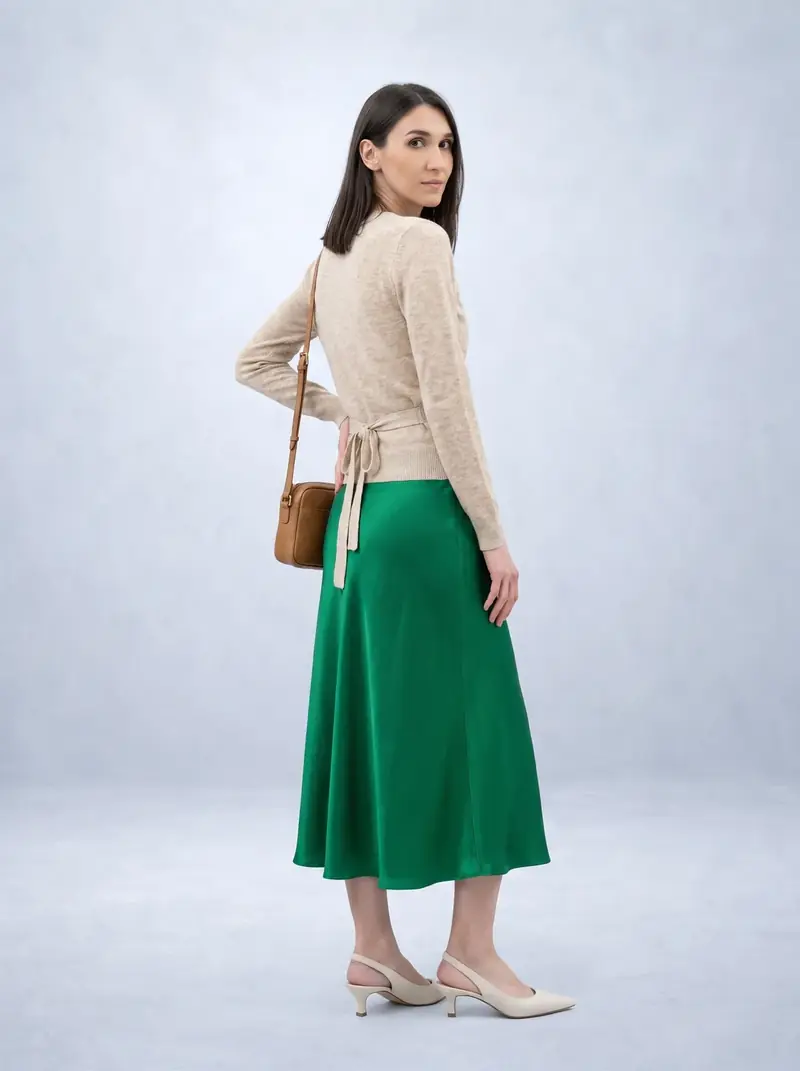
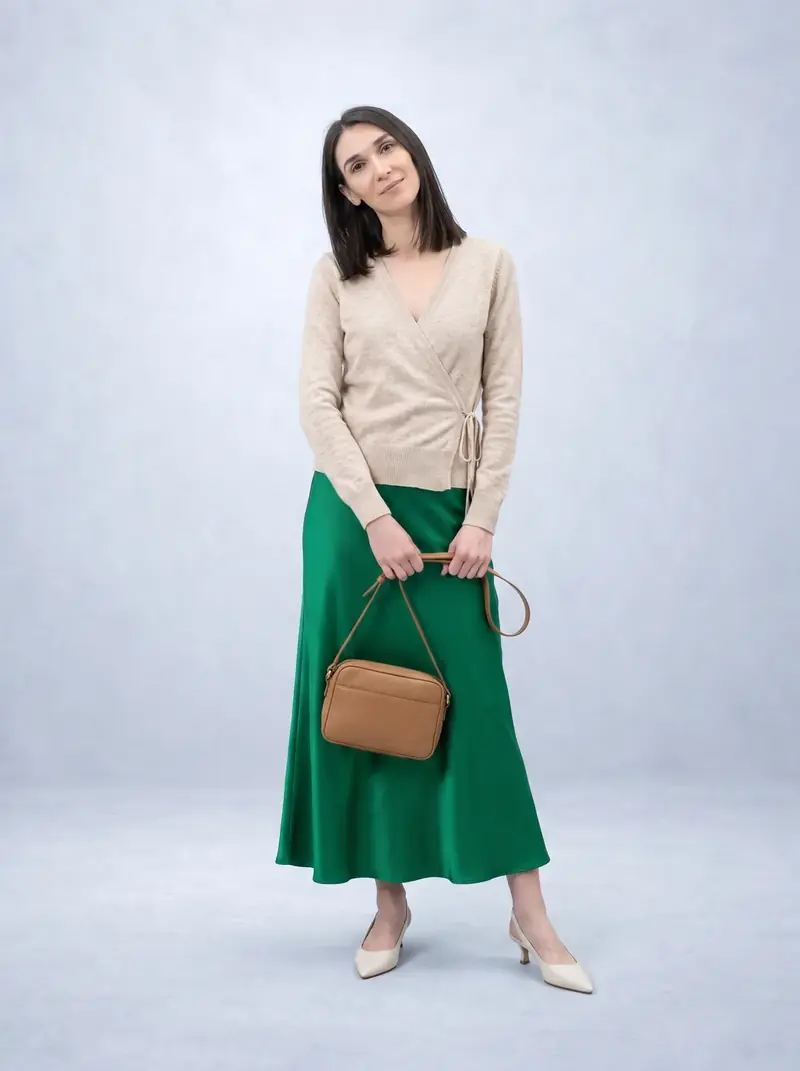
Same top, same outfit, same studio, one run of four: each pose was set per shot and generated to fit the scene, so the set reads as one shoot (front, walking, looking back over the shoulder, holding the bag).
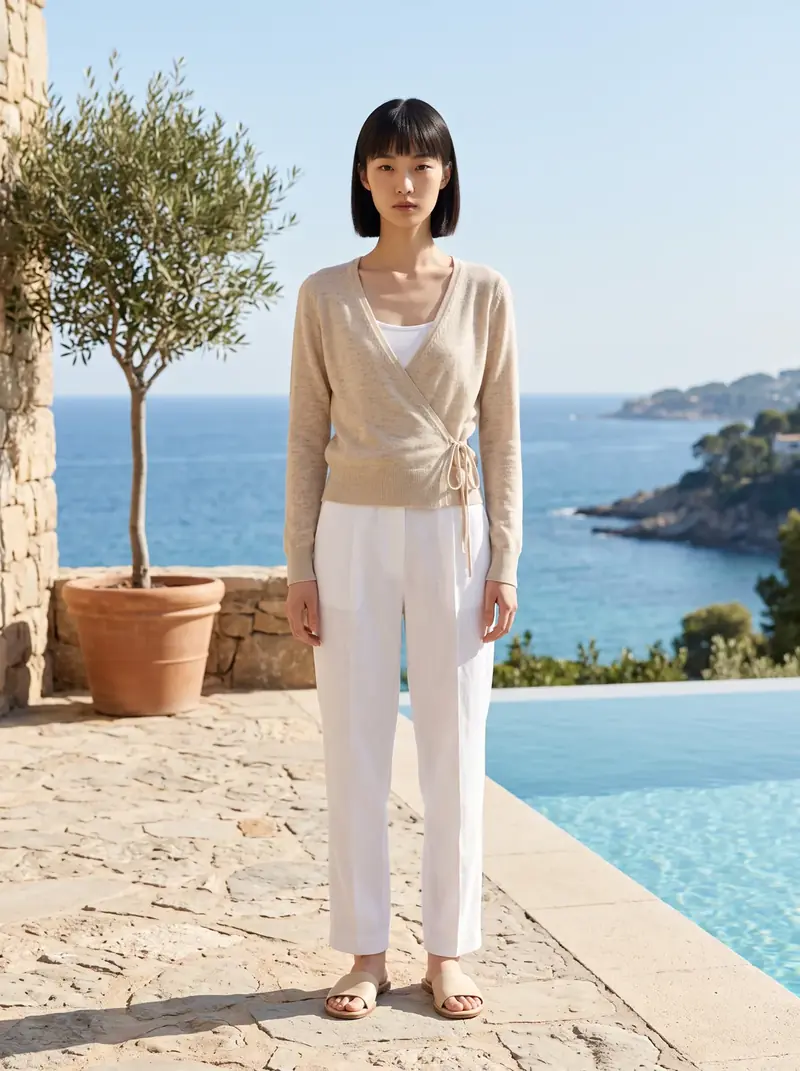
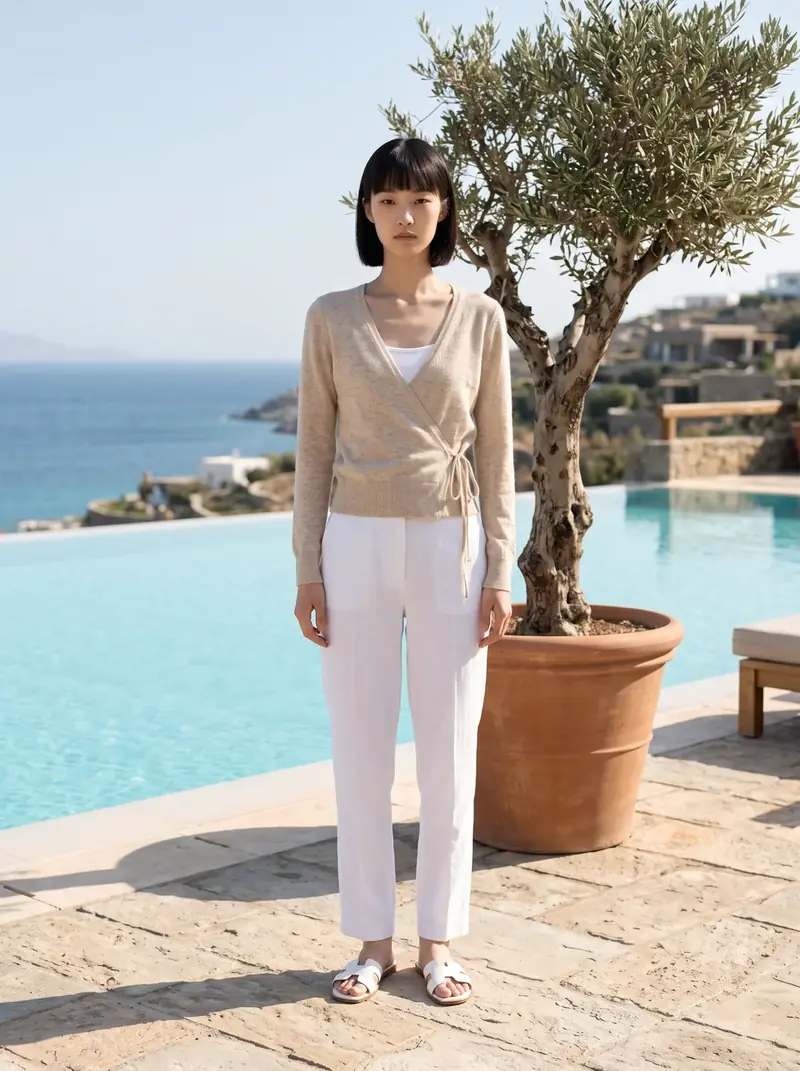
Our own side-by-side test on October 23: the same knit wrap top uploaded to Claid AI Fashion Models with a library model, no outfit items added, and the scene text “full-body shot on a sunny poolside terrace at a Mediterranean seaside resort, stone paving, olive tree, sea in the background,” run twice as two separate generations (10 credits each), next to GreenOnion's Poolside Resort background. Claid's fashion flow takes the scene as text only, so each run invents its own location; that tests text-to-scene, not how a tool handles a background image. What both runs did show: white trousers and sandals that Claid added on its own, though we added no outfit items. Two runs are not a benchmark; try your own garment.
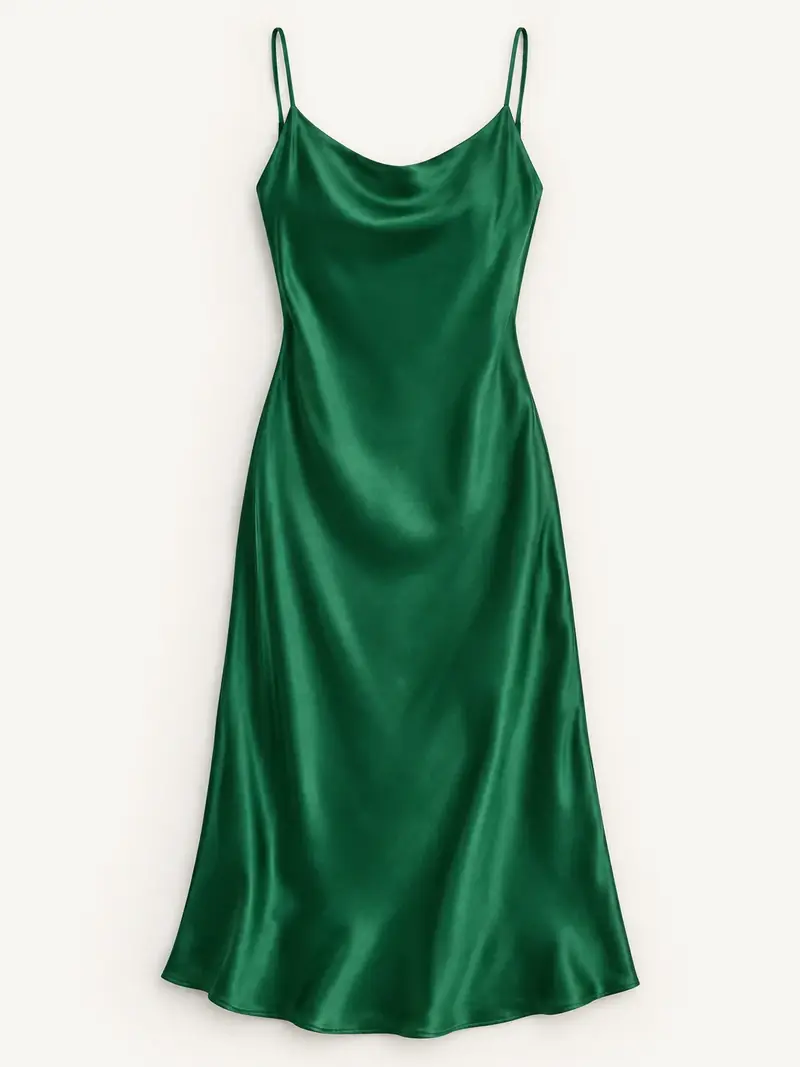
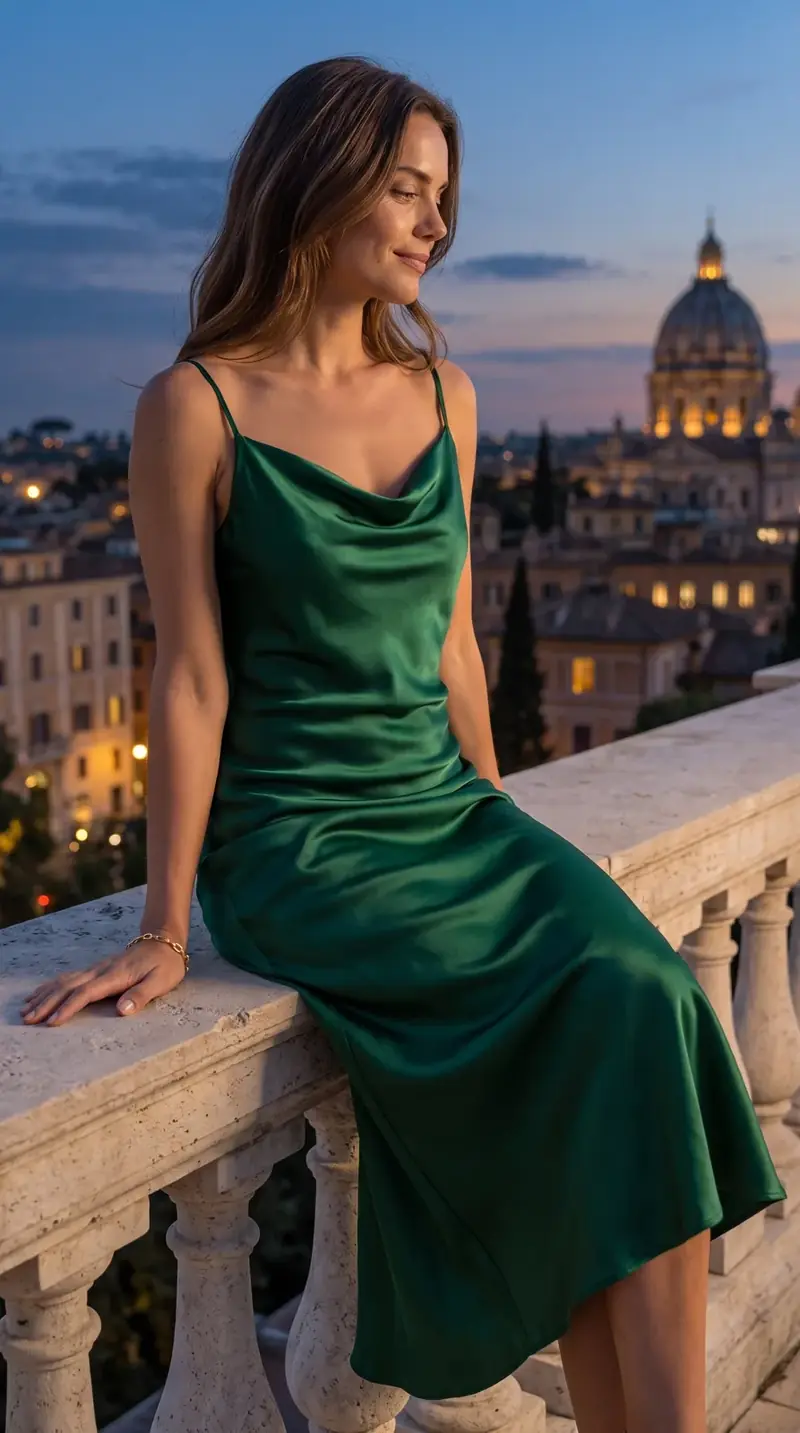
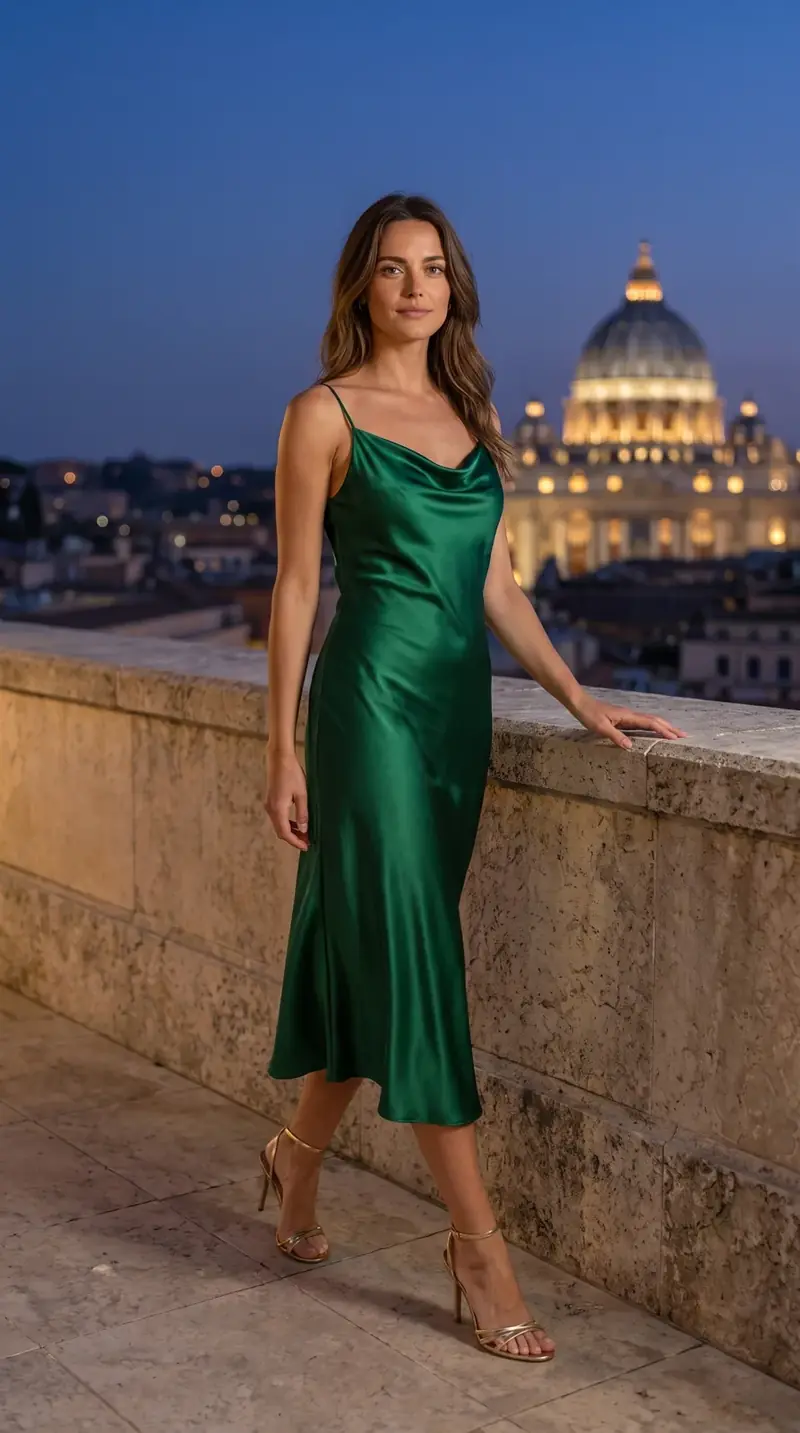
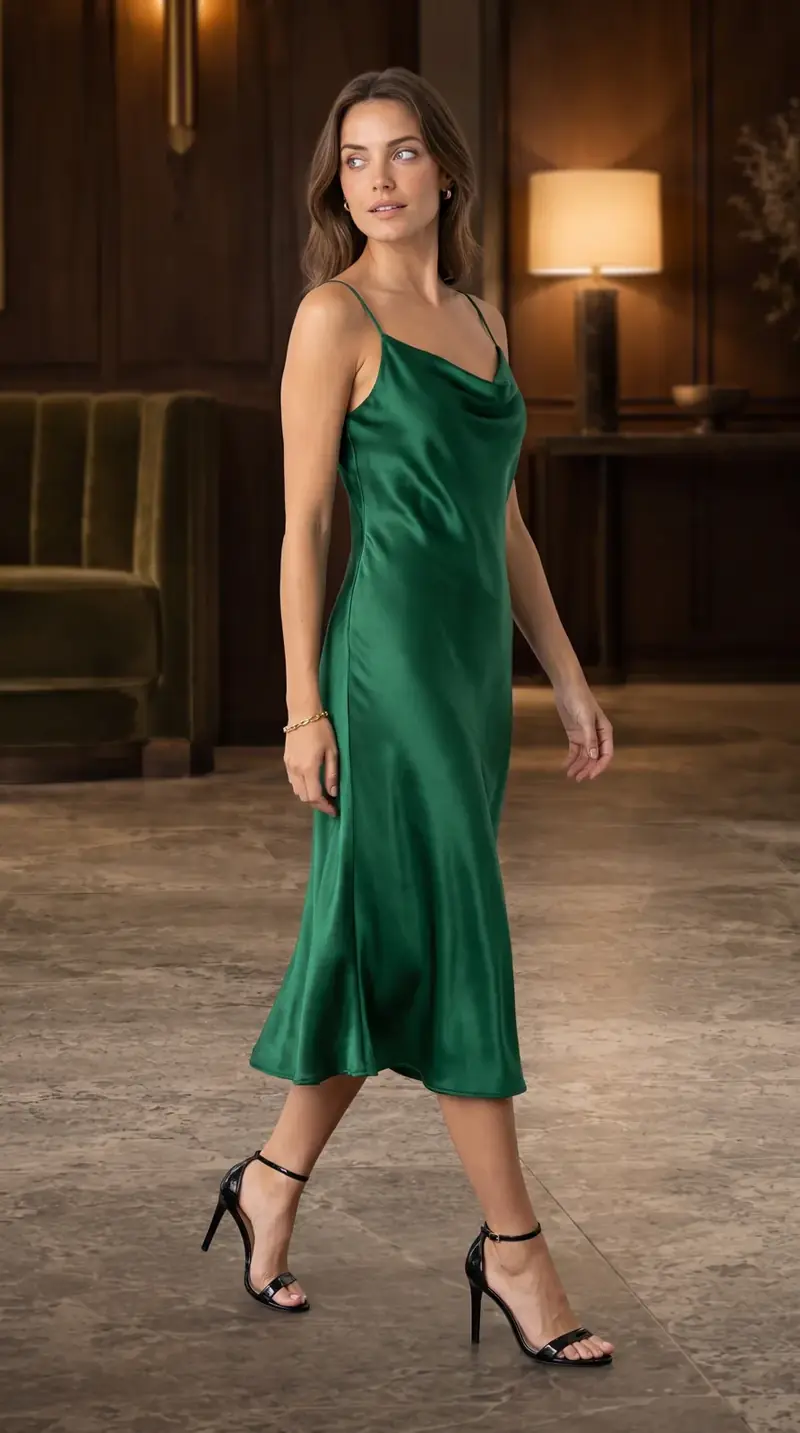
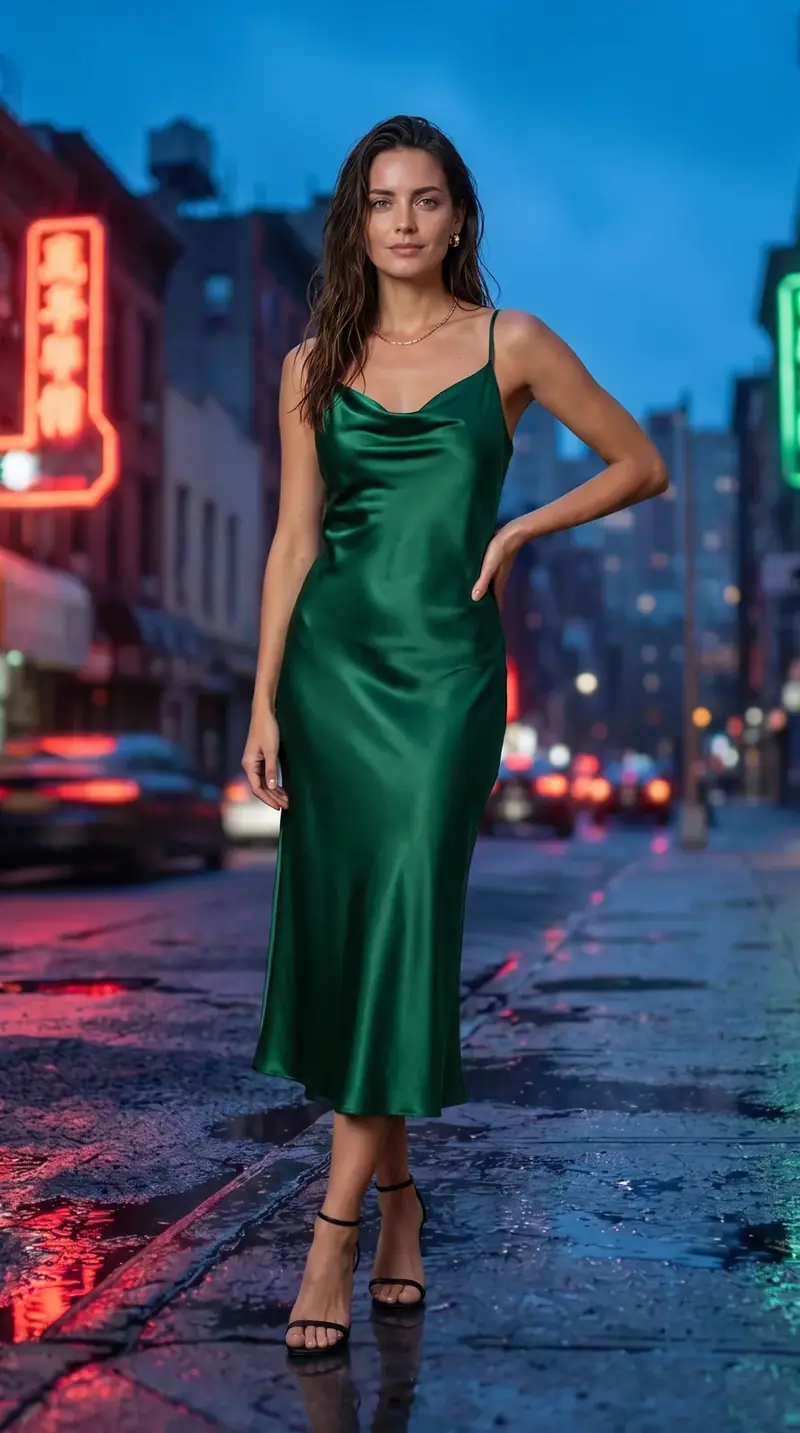
GreenOnion Fashion example: one photo of an emerald satin slip dress (a demo design from GreenOnion's starter outfits, not a real product photo) in, then separate runs: two with the Rome terrace background, one in a wood-panelled lounge, and one on a neon-lit street after rain. Same dress in every run; the model's look also varies a little between runs. The jewelry, heels, and props were added by the AI and are not in the input. The input shows only the front, so check the back, the cowl drape, and the hem length against the real dress before you publish.
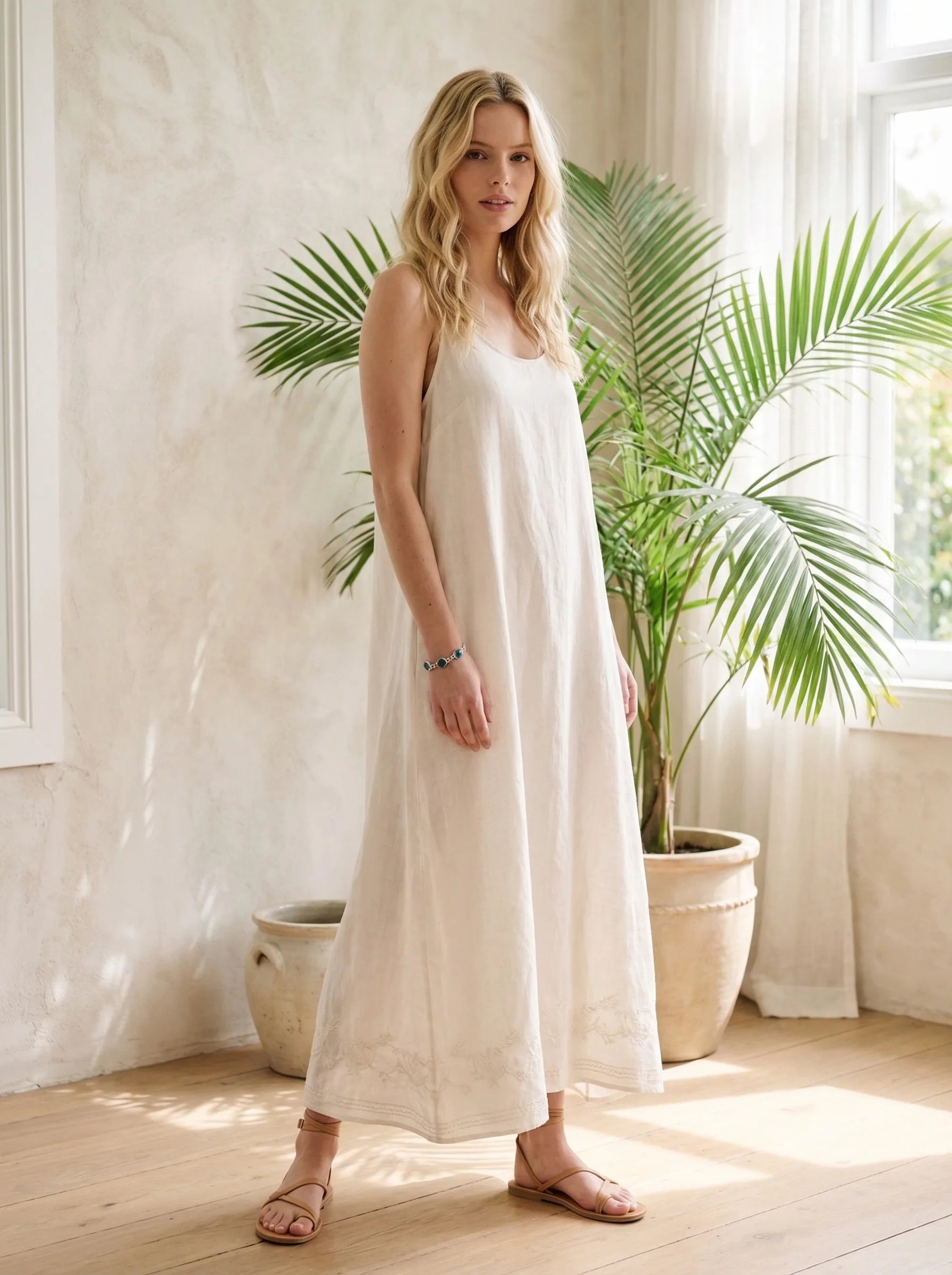
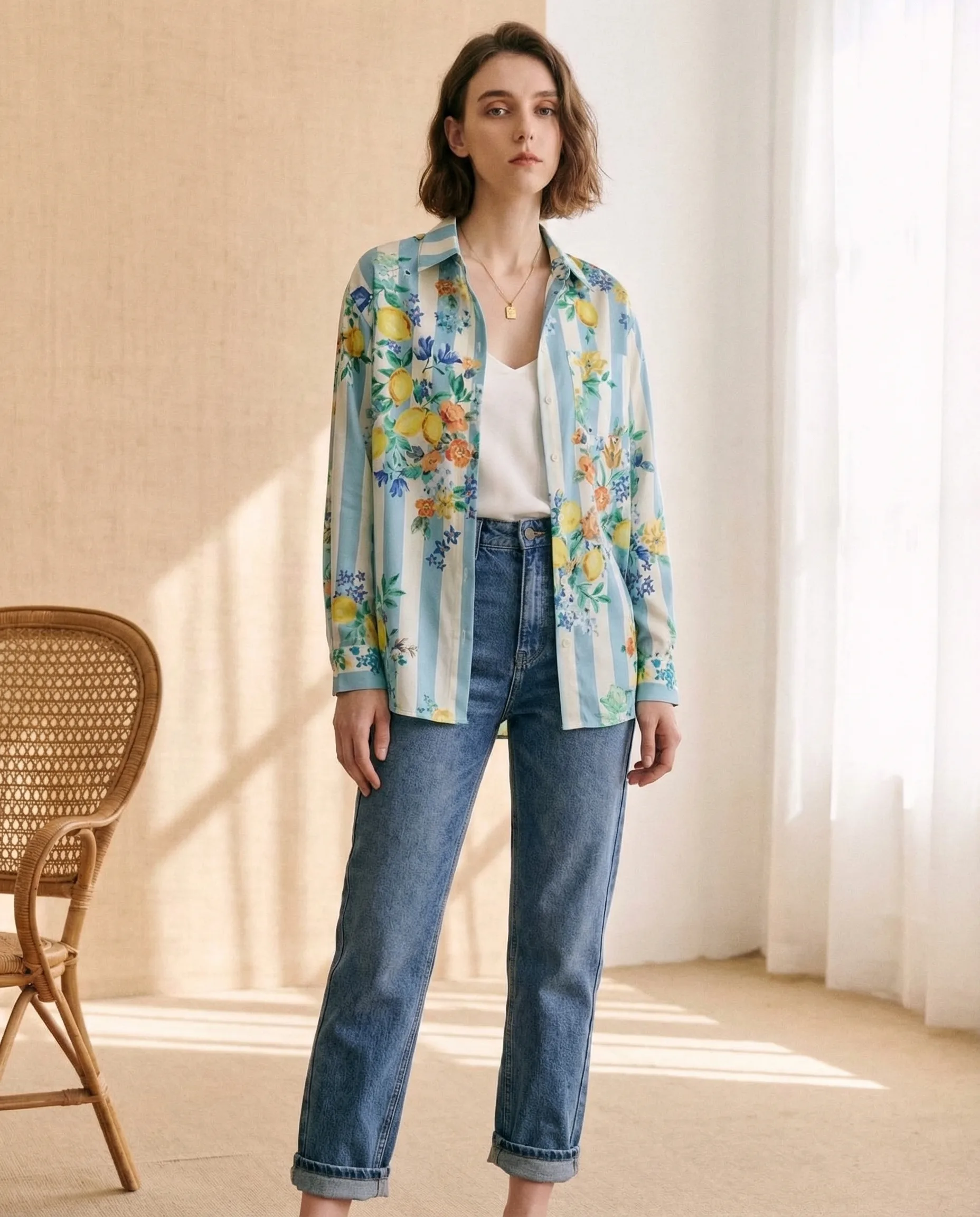
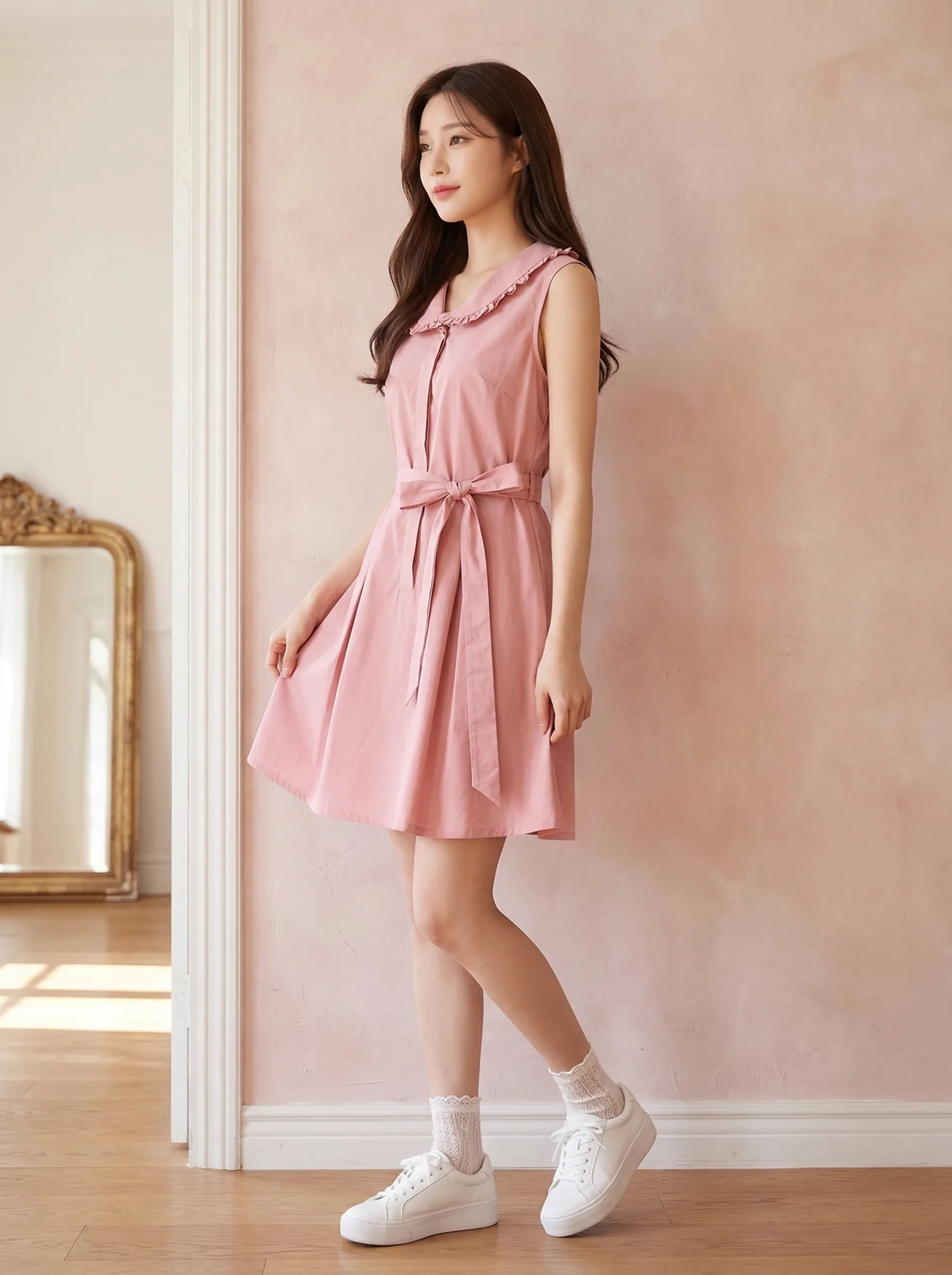

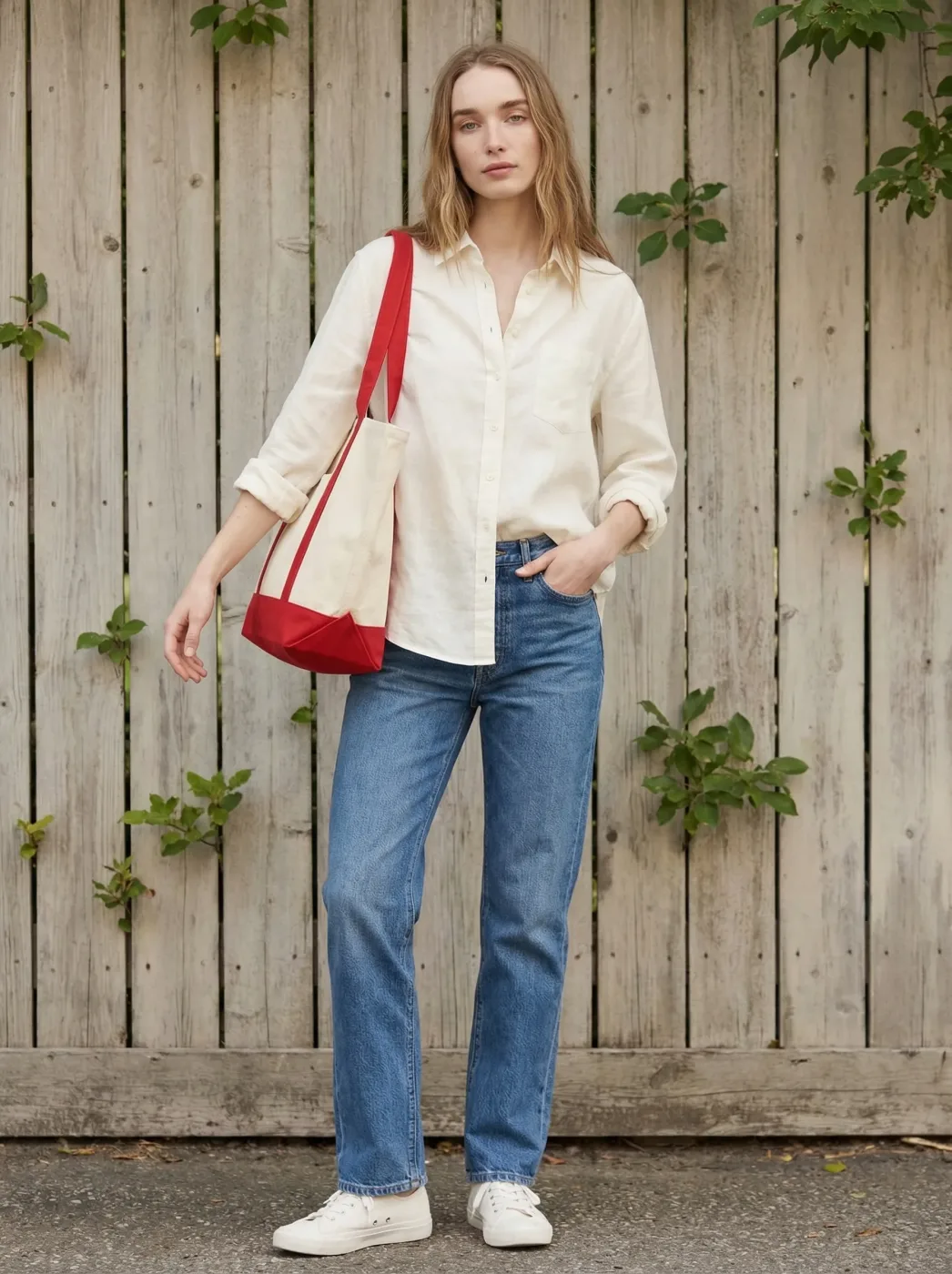
More output from the GreenOnion Fashion module, one image from each of five sets in our public gallery. Each set started from a single product photo (inputs not shown here), and the module chose or was given a different model and background for each. These show the range of models and scenes, not a controlled test; see the full sets on the AI fashion model examples page.
Strengths
- AI completes the outfit around the piece you sell
- Backgrounds behave like real locations: the angle and light change per shot
- Poses generated per shot: AI decides, a pose direction, or your own description
- Drag a frame over a body outline to set each image's crop, down to just the face
- Product Video turns the same project into a fashion video
- Model, background, outfit, framing, and pose are separate, editable choices
- Per-image Full/Upper/Lower body framing within one set
- Credit cost is shown before you generate
- Same account also covers Amazon, Etsy, and Shopify listing workflows
Limitations
- Free results on the web app are watermarked previews; downloading needs a paid plan (the Shopify app lists a 3-day trial)
- About $0.32 per 2K image on the $19 plan, above FASHN and usually above Claid
- More steps than a one-upload tool like FASHN, though you can click through them when you don't need the control
- AI outfit completion can add accessories you don't sell; unseen sides are inferred
- No self-serve API (API access only on custom Enterprise plans)
Best for: Small and mid-size clothing brands that want a planned set of on-model shots per product, with control over who wears it and how each image is framed. See more AI fashion model examples or try the AI fashion model generator.
The other eight tools
2. FASHN (Product to Model)
Best price per imagePrice: Basic $19/month (200 credits), Pro $49/month (750 + 50 daily bonus), Agency $99/month (1,500 + 100 daily), billed monthly; paying yearly gives about two months free. 10 free credits for new accounts. Top-ups $0.10 per credit. Check current pricing →
Input: FASHN's help center says only the product image is required: a clear flat-lay, ghost mannequin, or on-hanger photo. You can add up to three products per generation and get one to four outputs per run, at Auto, 1K, 2K, or 4K.
Control: An optional text prompt describes the model, pose, background, lighting, and camera style; without one, FASHN picks the model and scene from the product image. You can add an image prompt, a background reference, or a face reference for identity (+2 credits per image). Credits run 1 per image in Fast mode at any resolution, up to 3 for 4K in Quality mode.
Tradeoff: FASHN's own guidance asks for clean, top-down shots without wrinkles, shadows, or cropped edges, and notes that full-body results may need footwear and hair details in the prompt. Watermark and commercial terms are not stated on the pricing page.
Best for: Catalogs where cost per image matters most and you are comfortable steering with prompts.
3. Photoroom AI Fashion Models
Best low-cost all-in-one editorPrice: Pro $7.50/month, Max $20.99/month, Ultra $82.50/month, all billed yearly. AI Fashion Models allows up to 1,600 generations a month at 1K on Pro; 2K starts on Max (up to 185), 4K on Ultra (up to 310). Check current pricing →
Input: At least one source image; Photoroom recommends a sharp, well-lit, top-down photo showing the complete garment, and lets you add up to four items to one model. Its Flat Lay and ironing tools can clean up the source first.
Control: Choose from 20 preset models (counted in the app on October 23) or upload your own (custom model slots: one on Pro, three on Max, unlimited on Ultra), pick a pose from a list, choose or upload a background, and add prompt text such as “the model has her left hand in her pocket”. You can batch the same model and settings across up to 250 images.
Tradeoff: Pro is limited to 1K fashion images. On the free plan you can open every picker, but when we clicked Generate on October 23 it asked us to upgrade to Pro; the free plan is also for personal, non-commercial use only. Photoroom's guide says simple items such as T-shirts and jeans reproduce more accurately at scale.
Best for: Sellers who already need background removal and batch editing and want on-model images in the same app.
4. Botika
Best for ghost mannequin and hanger shotsPrice: Pro $55/month for 50 credits billed monthly, or $46/month billed yearly for 600 credits a year (2K, no Botika watermark). Advanced $120/month for 100 credits billed monthly, or $100/month billed yearly for 1,200 credits a year (4K, all models and backgrounds). Each photo costs 1 credit and each video 5. Free trial: 8 credits per the help center, no credit card; the account we opened on October 23 showed 20. Check current pricing →
Input: Botika's site says “Flat lay, hanger or ghost mannequin. Upload what you already have,” and its products page mentions uploading front, back, or side mannequin views. Bulk upload is offered.
Control: 150+ AI models across body types, skin tones, and markets, with selectable scenes, poses, and backgrounds. Pro includes only a limited set of models and basic backgrounds; the full library needs Advanced. Botika also makes short videos from a single photo.
Tradeoff: At about $0.92 to $1.10 per photo on Pro, Botika costs several times more per image than FASHN or Claid; yearly plans add retouch rounds. It is built for clothing, so it is not a fit for other product types.
Best for: Apparel brands with existing ghost mannequin or hanger photography that want on-model versions at catalog scale.
5. Claid AI Fashion
Best for API and catalog automationPrice: Essentials $15/month (500 credits, up to 2K) and Pro $49/month (2,000 credits, 2K/4K generation), billed monthly; $9 and $35 a month billed yearly. Free trial: 50 credits, which Claid's pricing table says covers 12 AI Fashion generations. Check current pricing →
Input: “Upload a flatlay or ghost mannequin shot.” Claid says the tool works best with those two, and it also accepts existing on-model images.
Control: 100+ AI models across ethnicities, ages, and body shapes (females, males, kids, plus-size, teens, older), or upload your own; each library model comes with preset pose photos to pick from, or describe a pose in the prompt. An outfit step can add bottoms or tops from preset items and generates shoes if you upload none. The scene is a free-text box (“Minimalistic studio background” by default). One run costs 10 credits for 1 to 4 images, in 1K Lite, 2K, or 4K. (Interface checked October 23.)
Tradeoff: Cost rises with quality: Claid's credits help article lists AI Fashion at 4 to 24 credits: 10 at PRO (2K) and 24 at Ultra (4K). Essentials stops at 2K; 4K generation needs Pro. The API key comes with Pro, and Claid also sells fashion generation through an AI Fashion Models API.
Best for: Teams that want fashion images through an API alongside background removal and upscaling.
Pic Copilot is closing. A service closure notice on Pic Copilot's pricing page says it stopped accepting payments from new users on September 27, 2026, and that the website and services close on December 7, 2026 at 23:59:59 (UTC+8). Active Pro subscriptions are being refunded. We no longer recommend it; if you used its Virtual Try On or AI Model Swap, download your images before the closing date.
6. Modelia
Best for multiple poses from one imagePrice: Starter free (20 credits/month, watermarked, up to 2K); Creator $30/month (150 credits, up to 4K); Atelier $109/month and Brand $385/month with Studio generations included. Monthly billing; 3 credits per standard image. Check current pricing →
Input: Modelia describes turning flat apparel images into model photos and lists Mannequin to Model and Product to Model tools.
Control: It says one image can become several poses while keeping the same outfit, model, and styling, and lists a Consistent Character tool. Outputs are labeled as AI-generated with C2PA Content Credentials.
Tradeoff: The free Starter plan carries a “Created by Modelia” watermark and is described as “for trying Modelia, not for publishing.” At 3 credits an image, Creator works out to about $0.60 per image. Modelia's Shopify app lists different plans from its website.
Best for: Brands that want several poses of the same look without reshooting.
7. Flair (fashion photoshoots)
Best for art-directed scenesPrice: Free (5 images); Pro $8/month; Pro+ $26/month (80 images); Scale $38/month (150 images); billed monthly, with an annual discount offered. Check current pricing →
Input: Upload clean product images; Flair says simple product-only shots on a neutral background can work. Its fashion photoshoots fit clothing and jewelry onto AI models and say patterns and logos are preserved.
Control: Flair's site describes picking a model type, pose, and style, then the environment and lighting, and its AI Human Builder makes custom models from features such as hair color and body type. When we opened the “Generate On Model Photography” workflow on October 23, the screen after upload had a free-text scene description, a Human Models slot that takes an uploaded person, and a Background row of preset backdrop photos (studio stool, drapes, plinths, painted backdrops) plus solid colors; there was no pose or framing control on that screen, so the pose comes from the scene text. On the free plan the aspect ratio was locked to 1:1 and each run makes 2 or 4 images. Editing tools include Regenerate Product and Regenerate Human.
Tradeoff: The company commercial license is listed from Pro+, so the $8 Pro plan may not cover store use. Pro image quotas did not load on the pricing page.
Best for: Brands that want campaign-style scenes and hands-on art direction.
8. Pixelcut On Model
Best for occasional on-model shotsPrice: Pro $8/month billed yearly ($10 monthly) with 600 AI credits; Business $24/month billed yearly ($30 monthly) with 3,600. Free plan exports without a watermark. Check current pricing →
Input: One product photo (JPG, PNG, or HEIC). Product Studio offers Studio, Lifestyle, and On Model shots, placing the item on an AI model or a ready-made persona, at up to 4K.
Tradeoff: Pixelcut does not document garment-specific controls such as framing, pose lists, or mannequin inputs on the pages we checked, and does not state credits per On Model image. The free plan lists no AI credits or commercial license.
Best for: Sellers of mixed products who need a few on-model shots alongside other product images.
9. ZMO.ai
Free start, high per-image pricePrice: Free (10 starting credits, 3 models); Basic $59 or $49/month (30 credits, 10 models); PRO $199 or $149/month (100 credits); Enterprise $799 or $599/month (400 credits). The page shows two unlabeled prices per plan; the lower is likely billed yearly. Check current pricing →
What it does: ZMO puts your product on an AI model from a library that grows by plan (3 to 80 models), with model customization and credit rollover on paid plans. One credit makes one standard-definition image. Its FAQ says you own the images you generate.
Tradeoff: At $49 to $59 for 30 credits, it costs more per image than any other tool here with a listed price, and the input requirements are not stated on the pages we opened.
Best for: Trying a few images for free; compare per-image cost before paying.
What happened to Lalaland? Lalaland was an enterprise-priced AI model library for fashion brands. As of October 11–12, 2026 its pricing page no longer loads (it returns a 404 error), and lalaland.ai redirects to a Browzwear page about custom AI models that does not mention Lalaland. Its status is unclear, so we no longer list it. Enterprise teams that want brand-specific models can compare Browzwear's offer with Botika's Enterprise plan, which lists exclusive custom AI models.
Free AI model generators: what you actually get
If you searched for a free AI fashion model generator, the short answer is that free tiers are for testing. Most give between three and 20 real images, and most come with a watermark, a resolution cap, or a no-commercial-use rule. Here is what each free option includes, as listed on October 11, 2026.
Swipe the table sideways to see all columns.
| Tool | What the free option includes | Main limit |
|---|---|---|
| FASHN | 10 credits for new accounts | Watermark and commercial terms not stated on the pricing page; check the Terms of Service |
| Claid | 50 credits. The pricing page's feature table says that covers 12 AI Fashion generations; at the 10 credits per run we were charged on Oct 23, it is 5 runs of 1–4 images | Watermark not stated; history kept 24 hours on the trial |
| Modelia | 20 credits a month (about 6 images), up to 2K | “Created by Modelia” watermark; described as “for trying Modelia, not for publishing” |
| ZMO.ai | 10 starting credits, 3 library models | Standard definition; model customization only on paid plans |
| Photoroom | Free plan opens the AI Fashion Models settings, but Generate asks you to upgrade to Pro (checked Oct 23) | Personal, non-commercial use only per Photoroom's help center |
| Flair | 5 generated images, 1 custom model | Company commercial license listed from Pro+ ($26/mo) |
| Pixelcut | Free plan exports without watermark | No AI credits or commercial license listed on the free plan |
| Botika | 8 free trial credits per its help center (updated Feb 2024); the account we opened on Oct 23 showed 20. No credit card needed | Watermark on trial images not stated |
| GreenOnion | 20 free credits at greenonion.ai (up to 20 images at 2K); the AI Fashion Models Shopify app lists a 3-day free trial on its paid plans | Free results are watermarked previews; downloading needs a paid plan. Web plans from $19/month for 60 credits |
Best free test runs: Claid's 50 trial credits cover about 5 runs of 1 to 4 images at the 10 credits per run we were charged, and FASHN's 10 free credits cover up to 10 Fast-mode images, which is enough to compare both on your hardest garment. GreenOnion's 20 free credits cover 10 to 20 watermarked preview images, depending on 2K or 4K. Modelia's free plan is watermarked and not meant for publishing, and Photoroom's free plan is personal-use only, so don't plan a store launch on either.
Which garment photo to upload: flat lay, ghost mannequin, hanger, or mannequin
The photo you already have often decides the tool. This is what each vendor documents, and what each input means for the result.
Swipe the table sideways to see all columns.
| Input you have | Tools that document it | What to expect |
|---|---|---|
| Flat lay | FASHN, Claid, Photoroom, Botika, Modelia | Shows the full garment with no body shape. Iron it, keep edges in frame, and avoid strong shadows. Fit is inferred by the AI. |
| Ghost mannequin | FASHN, Claid, Botika | Gives the AI the garment's 3D shape and neckline. Botika mentions uploading front, back, or side mannequin views. |
| On hanger | FASHN, Botika | Fast to shoot, but drape is distorted by the hanger. Check length and waist position in the output. |
| Real model already wearing it | Claid (existing on-model images), Photoroom (“a shot of someone wearing your products”) | The garment already shows real drape and fit; check that the new model keeps it. |
| Product photo on its own | GreenOnion, Pixelcut, Flair | The documentation asks for product photos without naming a format. Test your own flat lay or hanger shots. |
Whatever the input, the AI can only see what you show it. If you upload only the front, the back view is a guess. Upload back and detail shots when the tool accepts more than one image: GreenOnion takes up to five product photos, Photoroom up to four items, and FASHN up to three products per generation.


GreenOnion example from our public gallery. A hanger photo is enough: one shot of a quilted floral jacket on a wooden hanger in, a nine-image listing set out; five shown. This set was made with GreenOnion's Etsy listing workflow, which also puts the garment on a model, not with the Fashion module, and we don't have its exact settings, so read it as an example of on-model output, not of the Fashion controls. The cream top, rust trousers, and espadrilles were added by the AI. Compare the jacket's print, quilting, and striped piping with the real piece before you publish.
Garment fidelity: what to check before you publish
Vendors such as Botika and Flair say they preserve garment details, patterns, and logos. Treat that as the goal, not a guarantee, and check every image against the real product:
- Pattern and print: Are repeats, stripes, and motifs in the right place and scale? Lace and placed prints are hard to reproduce exactly, so compare them closely.
- Logos and text: Are spelling, size, and position correct? Regenerate or fix any warped lettering.
- Length and fit: Does the hem, sleeve, or rise land where it does on a real body of that size? Flat lays and hanger shots don't show fit, so the AI infers it.
- Construction: Straps, closures, zips, pockets, and seams. Unseen sides are invented.
- Color: Compare against the physical garment under daylight, not just the source photo.
- Added items: AI styling can add shoes, jewelry, or layers. Remove them or make clear they are not included.
Photoroom's own guide gives the same advice: check color, fit, logos or prints, zippers, buttons, and tags against the original before exporting.
Commercial use and licensing
Read the terms for the plan you will actually use. On the pages we checked: Photoroom's free plan cannot be used commercially; Flair lists a company commercial license from Pro+; Pixelcut lists a commercial license on Pro and Business; Modelia's free Starter is “not for publishing” and its content may be used to improve Modelia's models; ZMO's FAQ says you own the images you generate. FASHN, Botika, and Claid point to their terms of service rather than stating license terms on the pricing page.
Marketplaces also expect product images to represent the item accurately. An on-model image that changes the cut, color, or print can lead to returns and complaints whichever tool made it.
How to trial two tools before you pay
- Pick your hardest garment. Something with lace, a placed print or logo, a visible closure, or a fit that matters, not your simplest T-shirt.
- Use the same input in both tools. The same flat lay or ghost mannequin photo, plus a back view if both accept it.
- Ask for the same set. For example, a full-body front, an upper-body crop, and a back view on the same model.
- Score each image on pattern, logo, length, fit, color, hands, and face consistency across the set.
- Compute cost per usable image: plan price divided by the images you would actually publish after rerolls, plus your editing time.
- Check the license on the plan you would buy, not the trial.
Put your clothing on AI models
Upload up to five product photos, choose the model, background, outfit, framing, and pose or click through the suggestions, and see the credit cost before you generate. New accounts start with 20 free credits.
Try the AI fashion model generatorFrequently asked questions
What is the best AI fashion model generator?
GreenOnion Fashion is our pick for a styled set of on-model photos from one garment photo: it generates each pose and scene for the product and can complete the outfit around the piece you sell. In our own October 2026 test of one wrap top against FASHN and Botika, it placed first in all four rounds (model, outfit, pose, background). For a fast, low-cost single shot, use FASHN (the cheapest per image in our test); for a fixed, tagged model library and full control over every outfit piece, Botika. We make GreenOnion, and the full test is linked on this page.
Is there a free AI fashion model generator?
Yes, for testing. FASHN gives 10 free credits, GreenOnion 20 free credits, Claid a 50-credit trial, Modelia 20 credits a month, ZMO 10 starting credits, and Flair 5 free images. None of the free tiers we checked on October 11, 2026 is a practical free production tool: Modelia's free output is watermarked and "not for publishing," Photoroom's free plan is personal-use only, and Flair lists its commercial license from Pro+. GreenOnion gives new greenonion.ai accounts 20 free credits, but free results are watermarked previews and downloading needs a paid plan; its AI Fashion Models Shopify app lists a 3-day free trial.
Can I use free AI model images on my store?
Only if the tool's terms allow commercial use on that plan. Photoroom's free plan is explicitly non-commercial, Modelia's free Starter plan is watermarked and described as not for publishing, and Flair and Pixelcut list a commercial license only on paid plans. ZMO's FAQ says you own the images you generate and can use them for any purpose, subject to the rules of the platform where you post. For FASHN and Claid, the pricing pages we checked do not spell out free-tier commercial terms, so read their terms of service before you publish.
What does “AI model generator” mean on this page?
Here it means software that puts your real clothing on an AI-generated person for product photos. The same phrase is also used for 3D model generators and for machine-learning model tools, which this page does not cover.
Which AI fashion model tools accept ghost mannequin or hanger photos?
FASHN Product to Model names flat-lay, ghost mannequin, and on-hanger photos as inputs. Botika names flat lays, hangers, and ghost mannequin shots. Claid AI Fashion names flat lay and ghost mannequin photos.
Which AI fashion model generator is cheapest per image?
On listed prices checked October 11, 2026, FASHN Basic ($19/month for 200 credits, 1 credit per Fast-mode image) works out to about $0.10 an image, and Claid Essentials ($15/month for 500 credits) to about $0.12 at the 4 credits per standard image on its pricing page; in our October 23 runs Claid charged 10 credits per run of 1 to 4 images, which works out to $0.075 to $0.30 an image depending on how many you take. Photoroom Pro can be lower still if you use its full 1K allowance. Higher resolutions and extras such as face references cost more on every tool.
How much does AI fashion model generation cost?
Entry paid plans in this comparison range from $8 to $59 a month. Where vendors publish enough quota data, the listed or calculated cost runs from about $0.10 per FASHN Fast-mode image to $1.97 per ZMO standard-definition image, before rerolls and editing. GreenOnion is about $0.32 per 2K image on its monthly starter plan. Prices were checked October 11, 2026.
Vendor sources checked October 11, 2026
Plans, credits, and regional prices change. Verify the current vendor page before buying.
- Botika pricing
- Botika homepage (inputs, models)
- Botika products
- FASHN pricing
- FASHN Product to Model help
- FASHN app credit costs
- Photoroom pricing
- Photoroom: How to use AI Fashion Models
- Photoroom: flat lay to on-model guide
- Photoroom Virtual Model tool page
- Photoroom: Is the app free? (personal use)
- Claid AI fashion
- Claid pricing
- Claid credits (help center)
- Botika free trial (help center)
- Pic Copilot service closure notice (pricing page)
- Modelia homepage
- Modelia pricing
- Modelia Shopify app listing
- Flair pricing
- Flair homepage (fashion photoshoots)
- Flair on-model photography
- Pixelcut pricing
- Pixelcut AI product photos (On Model)
- ZMO.ai pricing
- ZMO.ai homepage (FAQ)
- Browzwear AI models page (where lalaland.ai now redirects)
- GreenOnion AI Fashion Models Shopify app