
Quick answer
Pixelcut and Photoroom cost almost the same at entry level ($8 vs $7.50 a month, both billed yearly) and both remove backgrounds, generate scenes, put clothing on AI models, and run on web, iOS, and Android. Billed month to month, Pixelcut Pro (a struck-through $10) is cheaper than Photoroom Pro ($12.99). The real differences are in the limits: what you can batch, how exports are counted, what the free plan allows you to sell, how many people can share an account, and what the API costs per image.
This page compares the two by those seller jobs, using each vendor's own pricing and help pages checked on October 11, 2026. We did not run a side-by-side image-quality test, so where output quality decides the matter, we tell you what to test instead of naming a winner.
Choose Pixelcut if… / choose Photoroom if…
You remove backgrounds from lots of photos inside the app
Start with: Pixelcut
Also consider: Photoroom
Pixelcut Pro lists unlimited background removal. Photoroom counts every saved image, including batch images, against 1,000 exports a month on Pro.
You want AI scenes or on-model shots for a whole catalog in one batch
Start with: Photoroom
Also consider: Pixelcut (one product at a time)
Photoroom's Batch runs AI Scenes, Product Staging, AI Fashion Models, Ghost Mannequin, and more. Pixelcut's help center says its batch editing only supports background editing and upscaling.
You need listing infographics (dimensions, callouts, size charts)
Start with: Pixelcut (of these two)
Also consider: GreenOnion, our pick for infographics written and laid out for you
Between these two, Pixelcut has a dedicated AI Product Infographics tool; we did not find an equivalent on the Photoroom pages we checked. If infographics are the main job, GreenOnion writes the headline and callouts from your selling points as part of a full listing set; see below.
You call an API from your own store or app
Start with: Photoroom
Also consider: Pixelcut
Background removal is $0.02 per image on Photoroom's Basic API vs 5 credits (about $0.05) on Pixelcut. Pixelcut's smallest plan is cheaper to start ($10 a month).
You want to sell using free-plan images
Start with: Neither, without checking
Also consider: Pixelcut (confirm first)
Photoroom's free plan is personal, non-commercial use only. Pixelcut's pricing page lists a commercial license only on paid plans, though its help center says commercial use is allowed.
Several people share one account
Start with: Photoroom
Also consider: Pixelcut Business (10 people)
Photoroom's pricing table lists up to 50 seats on Pro, Max, and Ultra. Pixelcut lists a 3-person team on Pro and 10 on Business.
You used remove.bg and only need cutouts
Start with: Canva Pro, or Pixelcut
Also consider: Photoroom
remove.bg's background removal is moving into Canva. If you do not want Canva, Pixelcut and Photoroom both include background removal on their entry plans.
| If you need… | Start with | Also consider | Why |
|---|---|---|---|
| You remove backgrounds from lots of photos inside the app | Pixelcut | Photoroom | Pixelcut Pro lists unlimited background removal. Photoroom counts every saved image, including batch images, against 1,000 exports a month on Pro. |
| You want AI scenes or on-model shots for a whole catalog in one batch | Photoroom | Pixelcut (one product at a time) | Photoroom's Batch runs AI Scenes, Product Staging, AI Fashion Models, Ghost Mannequin, and more. Pixelcut's help center says its batch editing only supports background editing and upscaling. |
| You need listing infographics (dimensions, callouts, size charts) | Pixelcut (of these two) | GreenOnion, our pick for infographics written and laid out for you | Between these two, Pixelcut has a dedicated AI Product Infographics tool; we did not find an equivalent on the Photoroom pages we checked. If infographics are the main job, GreenOnion writes the headline and callouts from your selling points as part of a full listing set; see below. |
| You call an API from your own store or app | Photoroom | Pixelcut | Background removal is $0.02 per image on Photoroom's Basic API vs 5 credits (about $0.05) on Pixelcut. Pixelcut's smallest plan is cheaper to start ($10 a month). |
| You want to sell using free-plan images | Neither, without checking | Pixelcut (confirm first) | Photoroom's free plan is personal, non-commercial use only. Pixelcut's pricing page lists a commercial license only on paid plans, though its help center says commercial use is allowed. |
| Several people share one account | Photoroom | Pixelcut Business (10 people) | Photoroom's pricing table lists up to 50 seats on Pro, Max, and Ultra. Pixelcut lists a 3-person team on Pro and 10 on Business. |
| You used remove.bg and only need cutouts | Canva Pro, or Pixelcut | Photoroom | remove.bg's background removal is moving into Canva. If you do not want Canva, Pixelcut and Photoroom both include background removal on their entry plans. |
Pixelcut vs Photoroom vs remove.bg, side by side (checked October 11, 2026)
Swipe the table sideways to see all columns.
| Seller job | Pixelcut | Photoroom | remove.bg |
|---|---|---|---|
| Entry paid plan | Pro $8/mo billed yearly (shown against a struck-through $10) | Pro $7.50/mo billed yearly ($12.99 billed monthly) | Pay-as-you-go 3 credits for $3, or $9/month for 40 credits; credits expire Dec 1, 2026 |
| Next tier | Business $24/mo billed yearly (struck-through $30) | Max $20.99/mo ($34.99 monthly), Ultra $82.50/mo ($99 monthly); yearly prices are billed yearly | — |
| Background removal | Limited on Free; unlimited on Pro and Business | Core tool on paid plans; each saved image counts as an export | Its core job; up to 50 MP at Best Quality; standalone site closes Dec 1, 2026 |
| AI scenes | Product Studio: Studio, Lifestyle, On Model; up to 4K | AI Backgrounds, AI Scenes, Product Staging, AI Shot List | No |
| On-model / fashion | On Model format; virtual try-on with library or custom models | AI Fashion Models (1K on Pro, 2K from Max, 4K on Ultra) | No |
| Infographics | AI Product Infographics tool | No dedicated tool found on the pages we checked | No |
| Batch | 1,000 batch exports/mo on Pro; batch = background removal and upscaling | Batch runs 10 AI tools; exports capped at 1,000/mo on Pro | — |
| API (background removal) | 5 credits ≈ $0.05/image; plans from $10/mo; 100 free credits | $0.02/image (Basic); e.g. $20 for 1,000 images; 10 free calls | Self-service API stops Dec 1, 2026 and moves to Leonardo.Ai; enterprise contracts continue |
| Free plan | Limited removal and upscale; exports without watermark | 100 exports/mo (25/week); personal, non-commercial use only | 1 free credit on first sign-in |
| Team | 3 people on Pro, 10 on Business; shared credit pool | Up to 50 seats on Pro, Max, and Ultra | — |
| Mobile apps | iOS and Android | iOS and Android | Not covered here |
Prices are in US dollars as shown on each vendor's page. Pixelcut's page says “Save 20% with a yearly plan” and shows the yearly-billed price next to a struck-through figure; we read $10 and $30 as the monthly-billed prices, but the page view we checked did not label them. Photoroom's Monthly toggle shows Pro $12.99, Max $34.99, and Ultra $99 a month (prices displayed in US dollars for the United States); its FAQ says the monthly AI credit amount can vary by country and that VAT/GST is included. Pixelcut's help center says prices can differ between iOS, Android, and web.
The three tools in brief
Pixelcut
Best value for unlimited cutouts and infographicsPrice: Free; Pro $8/mo billed yearly (600 AI credits); Business $24/mo billed yearly (3,600 AI credits). Check current pricing →
What it is: a web and mobile editor (iOS and Android) with background removal for images and video, upscaling, generative fill, a Bulk Image Editor, and an API. For sellers, the main tools are Product Studio, which turns one upload into Studio, Lifestyle, or On Model shots at up to 4K, and AI Product Infographics.
Where it is stronger: unlimited background removal and upscaling on Pro, a free plan that exports without a watermark, a dedicated infographic tool, and an API you can start for $10 a month.
Tradeoffs: batch editing is limited to background editing and upscaling, so AI scenes are made product by product. Team size is 3 on Pro and 10 on Business. If you search for “Pixelcut AI” and land on the name Pixa, Pixelcut's help center says Pixa is now Pixelcut again and accounts did not change.
Photoroom
Best for AI tools in batch and larger teamsPrice: Free (personal use); Pro $7.50/mo, Max $20.99/mo, Ultra $82.50/mo billed yearly, or $12.99, $34.99, $99 billed monthly; Enterprise custom. Check current pricing →
What it is: a product-photo editor on web, iOS, and Android with background removal, retouching, resizing, AI Backgrounds, AI Scenes, Product Staging, AI Fashion Models, AI Shot List, and Batch. Its pricing table includes a Shopify integration from Max upward.
Where it is stronger: Batch can run ten AI tools across many photos, including AI Scenes, Product Staging, AI Fashion Models, Flat Lay, and Ghost Mannequin. Every paid plan lists up to 50 seats. The background-removal API costs $0.02 per image.
Tradeoffs: exports are capped (1,000 a month on Pro, 3,000 on Max), and the cap counts batch images one by one. Its FAQ says export limits apply to assets up to 2K, and 4K image and video resolution is listed only on Ultra. The free plan cannot be used commercially.
remove.bg
Closing its standalone site December 1, 2026What it is: a one-job background remover, owned by Canva since 2021. Its site still offers “Good Quality” (up to 0.25 megapixels) and “Best Quality” (up to 50 megapixels) downloads, gives 1 free credit on first sign-in, and deletes uploads after 60 minutes.
What changes: the site banner says remove.bg's background removal is moving to Canva and the standalone website will no longer be available from 1 December 2026 at 9:00am CET. Its pricing page still sells pay-as-you-go credits (3 for $3) and a $9-a-month plan for 40 credits, with a note that credits expire December 1, 2026 at 9:00 AM CET. See what that means for you below.
Background removal and edge quality
Both tools remove backgrounds automatically, and both claim marketplace-ready results. Photoroom's Amazon page says it cleans up edges and produces Amazon-ready exports; Pixelcut lists Background Removal as a core tool for images and video. Neither publishes an edge-accuracy benchmark, and we did not run one, so we cannot honestly say whose cutouts are cleaner.
The documented differences are about limits and controls. Pixelcut Pro includes unlimited background removal; its help center calls background removal “practically unlimited” for subscribers. Photoroom counts every saved image as an export (1,000 a month on Pro), whether it comes from the editor, Batch, or Shopify sync. Photoroom's Remove Background API also lists green-screen despill and an uncertainty score, which help when you automate cutouts and want to flag weak ones for review.
Edge test to run on both free plans: pick three products that usually fail: one with fine detail (hair, fur, a fringe), one transparent or reflective (glass, chrome), and one with a white edge on a white background. Zoom to 200% on each edge and check for halos, chewed corners, and lost shadows.
For Amazon main images you still need a pure white background and only the product in frame. Our guide to white background product photography for Amazon covers the rules.
AI backgrounds and lifestyle scenes: how a scene request becomes an image
Both tools accept a product photo and a written scene description. They differ in how much the tool decides for you.
Swipe the table sideways to see all columns.
| Step | Pixelcut Product Studio | Photoroom |
|---|---|---|
| Input | One product photo (JPG, PNG, or HEIC) | A source image you upload or pick from Photoroom |
| Your request | Pick a ready-made scene from the library or type your own prompt; set angle and background | AI Scenes: type a prompt. Product Staging: a prompt is optional, for example “show my product being used outdoors” |
| What the tool keeps | Says it treats your product as the fixed part, keeping shape, label text, and colors | AI Scenes keeps position, angle, zoom, and aspect ratio unless asked; relights the product |
| People in the scene | On Model format adds an AI model or persona | AI Scenes avoids people and hands; Product Staging usually adds a human element |
| Planning help | Several variations per upload to compare | AI Shot List suggests front, back, side, detail, and lifestyle shots with previews (Shopify sidebar; also listed among Batch AI tools) |
| Output | Up to 4K | Export limits apply up to 2K; 4K listed on Ultra |
In practice: Pixelcut's library of ready-made scenes is the quicker start if you do not want to write prompts. Photoroom gives you more distinct scene tools: AI Scenes for a product-only setting that keeps your framing, Product Staging when you want a hand or person, and AI Shot List when you want suggestions for which angles to make. Photoroom warns that Shot List results can differ from the previews, especially detail and lifestyle shots.
Both tools can produce scenes without a detailed prompt: Pixelcut offers ready-made library scenes, Photoroom's Product Staging can choose a setting when you leave the prompt empty, and AI Shot List suggests which shot types to make. Neither tool's pages that we checked describe expanding a short idea into an editable written scene description before you generate. For more on prompts and background choices, see how to change a product photo background with AI.
On-model and fashion images
Photoroom AI Fashion Models starts from at least one garment image (you can add more for a full outfit and accessories). You choose a pre-made model or upload your own, pick a pose, and set a background. The Quality setting changes resolution and credit use: 1K on Pro, 2K from Max, and 4K only on Ultra. It also runs in Batch, which matters if you shoot dozens of SKUs a week.
Pixelcut has two routes. Product Studio's On Model format places the product on an AI model or a ready-made persona, with the look, setting, and mood set by you. Its virtual try-on page takes a garment photo, on its own or on a person, and fits it onto Pixelcut's library of models or a model you upload.
For apparel catalogs, Photoroom's batch support is the deciding difference. For a few hero pieces, either is worth testing on your most detailed garment: check prints, logos, hems, and how the fabric falls.
Infographics
Pixelcut AI Product Infographics takes a product photo, optional extra angles, and optional plain-text instructions. Its page lists formats for dimension labels, feature callouts, size charts, spec and comparison tables, what's-in-the-box grids, before-and-after images, and how-to steps, in Minimal, Bold, Premium, Natural, and Lifestyle styles. The page says the graphics include short selling-point text but does not say whether the AI writes that copy or you supply it, or whether you can edit the text afterward. Read every generated claim before publishing.
Photoroom: its pricing table includes a “Product & Listing AI tools” allowance and its editor supports templates, but none of the Photoroom pages we checked described an infographic generator. If infographics are your main need, test Pixelcut first.
Batch and bulk limits, and the mobile apps
Swipe the table sideways to see all columns.
| Pixelcut | Photoroom | |
|---|---|---|
| What batch can do | Background editing and upscaling only | 10 AI tools, including AI Scenes, Product Staging, AI Fashion Models, Ghost Mannequin, Flat Lay |
| Monthly cap | 1,000 batch exports on Pro, 2,000 on Business | 1,000 exports on Pro, 3,000 on Max, 10,000 on Ultra (all exports, not just batch) |
| Weekly cap | Not stated | 250 on Pro, 750 on Max; none listed on Ultra |
| Batch on mobile | Yes: pick photos from the library on iOS or Android | Yes: AI tools toolbar on iOS and Android |
Both have full iOS and Android apps. Pixelcut says a purchase on one platform works on all of them when you sign in with the same account, though prices can differ between iOS, Android, and web. Photoroom says mobile payments go through the Apple App Store or Google Play, while desktop payments are by card.
API pricing
Both APIs are billed separately from the app plans, are monthly, and do not roll unused volume into the next month.
Swipe the table sideways to see all columns.
| Pixelcut API | Photoroom API | |
|---|---|---|
| Billing unit | Credits at $0.01 each; plans from 1,000 credits for $10/mo | Images; Basic examples: $20 for 1,000, $40 for 2,000 |
| Background removal | 5 credits (≈ $0.05 per image) | $0.02 per image (Basic plan) |
| AI backgrounds | Generate Background: 10 credits (≈ $0.10) | Image Editing API (Plus): $0.10 per image |
| Other endpoints | Upscaler, Outpaint, Try-On (10 credits each) | Plus includes AI Shadows, AI Expand, Ghost Mannequin, Virtual Try-On, Product Staging |
| Free to start | 100 free credits for new developer accounts | 10 free production calls; 1,000 watermarked sandbox calls a month |
| Large volume | Custom pricing above 1M credits a month | Enterprise: annual commitment, 200K images minimum |
At 1,000 background removals a month, Photoroom works out to $20 and Pixelcut to about $50. If you only need a few hundred cutouts, Pixelcut's $10 plan (about 200 removals) is the cheaper starting point.
Free plans and commercial-use terms
Photoroom Free allows 100 exports a month, capped at 25 a week. Photoroom's help center states: “You cannot use a free account for commercial purposes.” If you sell products, you need a paid plan.
Pixelcut Free lists “Limited Background Removal,” “Limited Upscale,” and “Free export without watermark.” Pixelcut's help center says free users have more limited access to generative models, “typically 3 uses/day.” On commercial use the signals differ: the pricing page lists a “Commercial license” only under Pro and Business, while the help article “Can I Use Pixelcut for Commercial Purposes?” says yes without naming a plan. Ask Pixelcut in writing before you rely on free-plan images in a store.
Paid plans, billing basis, and team seats
Pixelcut: Pro is $8 a month billed yearly with 600 AI credits, unlimited background removal and upscaling, a 3-person team, and 1,000 batch exports a month. Business is $24 a month billed yearly with 3,600 AI credits, a 10-person team, and 2,000 batch exports. Team members draw from one shared credit pool.
Photoroom: Pro is $7.50, Max $20.99, and Ultra $82.50 a month, billed yearly, or $12.99, $34.99, and $99 billed month to month. Month to month, Pixelcut Pro (a struck-through $10, which we read as its monthly price) is cheaper than Photoroom Pro; billed yearly, the two are within 50 cents. For the full Photoroom plan breakdown, see our Photoroom pricing and alternatives guide. Pro includes 8,000 AI credits and 1,000 exports, Max 25,000 credits and 3,000 exports, and Ultra 75,000 credits and 10,000 exports. Every tier lists up to 50 seats. Max adds 2K fashion models, the Video Generator, and the Shopify integration; Ultra adds 4K.
For a solo seller paying yearly the entry plans are close in price; paying monthly, Pixelcut Pro is cheaper. For a team of four or more, Photoroom Pro is the cheaper way to give everyone access; Pixelcut needs Business.
remove.bg moves into Canva: what it means if you are choosing
remove.bg's site banner says its background removal “is moving to Canva” and that the standalone website “will no longer be available from 1 December 2026 at 9:00am CET.” For developers, its API page says: “Starting December 1, 2026, background removal moves to Leonardo.Ai, also part of Canva.” Until then its pricing page still sells pay-as-you-go credits (3 for $3) and a $9-a-month subscription for 40 credits, but warns that credits expire December 1, 2026 at 9:00 AM CET.
remove.bg's FAQ explains what happens to existing customers:
- Annual subscriptions keep working until December 1 at 9:00am CET, then end; unused time is refunded pro rata to the original payment method, with no action needed.
- Monthly subscriptions end automatically on that date, and any final renewal on or after November 1 is free.
- Unused pay-as-you-go credits expire on December 1, 2026.
- Invoices and credit usage reports must be exported from your Account page before the date; accounts are not accessible afterward.
- The self-service API stops accepting requests on December 1 and moves to Leonardo.Ai; enterprise API contracts continue as normal.
The FAQ points single-image and bulk users to Canva, which it says offers bulk background removal, and higher-volume automated users to Leonardo.Ai's API.
remove.bg vs Photoroom (and Pixelcut) after the move
If you used remove.bg only for cutouts, you have three practical routes. Canva: its pricing page lists background removal as unavailable on Free and included on Pro (US$144 a year for one person) without using AI allowance; Business is US$250 a year per person. That suits you if you already design social posts, banners, or presentations in Canva. Pixelcut: unlimited background removal on Pro at $8 a month billed yearly. Photoroom: background removal on every paid plan, within the export cap, plus the cheapest API rate here.
Photoroom or Pixelcut vs Canva
Canva is a design suite with product-photo tools added; Photoroom and Pixelcut are product-photo tools first. Canva's Background Generator is Pro-only. For product scenes in batch or on-model images, Photoroom or Pixelcut fit better; for mixing product cutouts into marketing designs, Canva fits better.
Where GreenOnion fits (a different job)
GreenOnion is not a background remover and does not win this comparison. Its job is a planned set of images for an Amazon, Etsy, or Shopify listing, and for that job, with infographics, lifestyle scenes, and A+ Content, it is our pick. In our October 2026 side-by-side test of one handmade bag, GreenOnion won the lifestyle round and tied Canva on the infographic against Photoroom, Canva, and Google Flow (Pixelcut was not in that test). Pixelcut's Product Studio also turns one upload into a set of product photos, and Photoroom's AI Shot List suggests front, back, side, detail, and lifestyle shots with previews. GreenOnion's difference is that it writes a plan for each image by listing role, including copy for infographic images, which you can edit, skip, or accept as-is before generating. You upload up to five product photos, optionally add product details, then get a plan of image roles (for Shopify, roles such as a white-background hero, detail close-up, and product angle). Each role has its own description, which you can edit, skip, or accept before you choose which images to generate. Writing is optional: you can click through with the AI's proposed plans, or type a word, a sentence, or more as a creative direction and the AI expands it. Either way the plans still need checking, because the AI can add details you did not give.

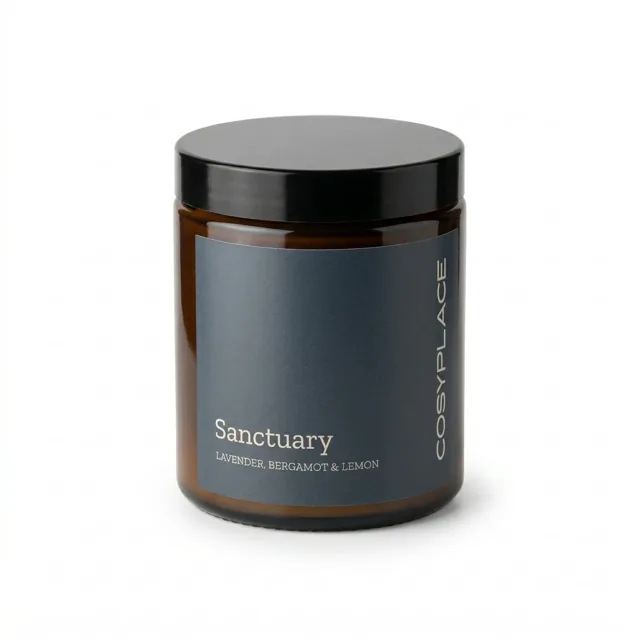



GreenOnion Shopify example from our public gallery: one candle photo in, several images out (four shown). Check what changed: the outputs add a vertical COSYPLACE wordmark that is not visible in the input photo, the white-background hero adds a black lid, and the feature image prints soy-wax, essential-oil, and 40-hour burn-time claims (one of them twice) plus garbled handwriting in the notebook. Those claims are only usable if they are true for your product, and the duplicate text and handwriting would need editing or regenerating.
GreenOnion
Our pick for listing sets: infographics, lifestyle, A+Price: $19/mo for 60 credits ($15.20/mo billed yearly), $49 for 180, $149 for 600; 20% off yearly. 1 credit = one 2K image; 4K uses 2. 20 free credits on sign-up; free results are watermarked previews, and downloading needs a paid plan.
Choose it over Pixelcut or Photoroom when the job is a complete listing set, including infographics with copy, typography, and layout, or Amazon A+ modules, rather than single edits. It has separate workflows for Amazon Listing, Amazon A+, Amazon Brand Store, Etsy, Shopify, Product Photography, Fashion, and Product Video.
Choose Pixelcut or Photoroom instead when you need fast, cheap, high-volume background removal, a free plan, an API, or a mobile app. GreenOnion has no self-serve API, its free results are watermarked previews (downloading needs a paid plan), its paid plans start above both tools' entry prices, and its image editor's Remove BG option is not a bulk cutout tool. Generated copy and AI-added product details always need review. Try the Shopify product image generator, the Amazon listing image generator, or AI product photography.
How to test Pixelcut and Photoroom in an afternoon
- Use the same three hard photos in both: fine edges, a transparent or reflective item, and a light product on a light background.
- Remove backgrounds and zoom to 200%. Note halos, lost details, and whether shadows look natural.
- Make one scene with the same sentence in both, for example “on a linen tablecloth by a window in morning light.” Check the label, color, and proportions against the real product.
- Run a batch of 20 images and time it. Check how many exports each tool counted.
- Read the terms for your plan: commercial use, export caps, resolution, and how many teammates you need.
- Work out cost per usable image: plan price ÷ images you would actually publish.
For a wider view of tools beyond these two, see our best AI product photography tools for Amazon sellers.
Need a full listing set, not just a cutout?
Upload a product photo and review the plan for each image: edit or skip roles, or accept the plan and generate. New accounts start with 20 free credits.
Try the Amazon listing image generatorFrequently asked questions
Is Pixelcut or Photoroom better for background removal?
We did not run an edge-quality test, so neither wins on output here. On terms, Pixelcut Pro ($8/month billed yearly) includes unlimited background removal, while Photoroom Pro ($7.50/month billed yearly) counts saved images against 1,000 exports a month. For an API, Photoroom's background removal costs $0.02 per image and Pixelcut's about $0.05 (5 credits at $0.01). Test your hardest product photos on both.
Is Pixelcut free, and can I use free exports commercially?
Pixelcut has a free plan with limited background removal and upscaling and exports without a watermark. Its pricing page lists a commercial license under Pro and Business, while its help article on commercial use says Pixelcut can be used for commercial projects without naming a plan. Confirm with Pixelcut before selling with free-plan images. Photoroom's free plan is explicitly personal, non-commercial use only.
What happens to remove.bg after December 1, 2026?
remove.bg says its standalone website will no longer be available from 1 December 2026 at 9:00am CET and that its background removal is moving to Canva. Its API page says background removal moves to Leonardo.Ai, also part of Canva, from the same date. remove.bg's FAQ says annual subscriptions keep working until then and get an automatic pro-rata refund for unused time; monthly subscriptions end automatically, and any final renewal on or after November 1 is free; unused pay-as-you-go credits expire on December 1; and you should export invoices and your credit usage report before then. The self-service API stops accepting requests on December 1, while enterprise API contracts continue.
Photoroom vs Canva: which is better for product photos?
Photoroom is built for product photos: background removal, AI Scenes, Product Staging, AI Fashion Models, and batch processing of those tools. Canva is a design suite; its background remover and background generator are unavailable on the free plan and included on Pro (US$144 a year for one person). Choose Canva if you also make social posts and presentations in the same place.
Which is cheaper, Pixelcut or Photoroom?
It depends on how you pay. Billed yearly, they are almost the same: Photoroom Pro is $7.50/month and Pixelcut Pro is $8/month. Month to month, Pixelcut is cheaper: Photoroom Pro is $12.99/month, while Pixelcut Pro shows a struck-through $10 that we read as its monthly price. At the next tier, Photoroom Max is $20.99/month billed yearly ($34.99 monthly) and Pixelcut Business is $24/month billed yearly. Photoroom says its monthly AI credit amount can vary by country. Checked October 11, 2026.
Is Pixelcut the same as Pixa?
Yes. Pixelcut's help center says the Pixa name has been switched back to Pixelcut and that nothing about accounts, subscriptions, projects, or tools changed. You may still see the Pixa name in some places while Pixelcut updates its site and apps.
Vendor sources checked October 11, 2026
Plans, credits, and regional prices change. Verify the current vendor page before buying.
- Pixelcut pricing
- Pixelcut AI product photos (Product Studio)
- Pixelcut AI product infographics
- Pixelcut virtual try-on
- Pixelcut homepage (tools, apps)
- Pixelcut API
- Pixelcut API pricing (developer docs)
- Pixelcut help: usage limits
- Pixelcut help: commercial use
- Pixelcut help: batch edit
- Pixelcut help: pricing across platforms
- Pixelcut help: organizations
- Pixelcut help: Pixelcut/Pixa branding
- Photoroom pricing
- Photoroom help: is the app free? (commercial use)
- Photoroom help: export limits
- Photoroom API pricing
- Photoroom help: AI tools available in Batch
- Photoroom help: AI Scenes
- Photoroom help: Product Staging
- Photoroom help: AI Shot List
- Photoroom help: AI Fashion Models
- Photoroom AI product photography for Amazon
- remove.bg homepage (sunset banner)
- remove.bg FAQ
- remove.bg pricing
- remove.bg API (Leonardo.Ai move)
- Canva pricing