
Pebblely pricing at a glance (checked November 7, 2026)
Swipe the table sideways to see all columns.
| Plan | Billed monthly | Billed yearly | Images per month | Cost per image |
|---|---|---|---|---|
| Lite | $9/mo | $90/yr ($7.50/mo) | 30 | $0.30 monthly, $0.25 yearly |
| Basic | $19/mo | $179/yr | 200 | About $0.10 monthly, $0.07 yearly |
| Pro (labeled “Best value”) | $39/mo | $379/yr | 500 | About $0.08 monthly, $0.06 yearly |
The monthly prices and image counts are on Pebblely's pricing page. The yearly totals appear when you switch that page to “Yearly: 2+ months free” (“Billed $90 annually”, “Billed $179 annually”, “Billed $379 annually”). The FAQ confirms the $179 and $379 yearly prices. It lists them “respectively” after the 200-image $19 plan and the 500-image $39 Pro plan, so they belong to Basic and Pro. The FAQ gives no yearly price for Lite.
Cost per image is our arithmetic, and it assumes you use every credit. Two things raise the real cost. Unused credits do not roll over to the next month. And Pebblely's optional High-resolution mode costs 2 credits per image, so Basic's 200 credits make about 100 high-resolution images.
What each Pebblely plan adds
On the pricing page, all three plans list “40+ background themes” and “Custom prompts”. Basic and Pro add “Bulk generate”. Lite does not list it. The plans otherwise differ only in image count.
On the FAQ page, “paid plans” also include reference images, images in different sizes for social media, and bulk generation for several products at once. That FAQ entry names only the $19 and $39 plans. The two pages therefore do not say clearly whether Lite includes reference images and extra sizes. If you need them, ask Pebblely before buying Lite.
Resolution: Pebblely does not state output dimensions in pixels on any page we opened. Its how-to guide describes a High-resolution mode that “uses a more powerful model that produces sharper, more detailed results”. It takes about 30 seconds per image, compared with about 10 seconds for a standard image. Sizes offered are Square (1:1), Portrait (4:5), Story (9:16), Landscape (16:9), and Facebook Ad (16:9).
Free trial, refunds, and image ownership
Is there a Pebblely free trial?
No. In the FAQ on Pebblely's pricing page, the answer to “Can I get a free trial?” is “We do not offer free trials.” No free plan is listed. Pebblely's terms of service (last modified 14 February 2024) still say Pebblely “offers a generous free version”. We treat that as older text, because the current pricing page offers no free option. The cheapest way to try Pebblely is one month of Lite at $9.
Can you get a refund?
Usually not. The pricing-page FAQ says “we cannot offer refunds”. The FAQ page says “we are not able to offer refunds” because you get immediate access to generated images. The terms add one exception: “If you have not generated any images yet, email us at [email protected] to apply for a refund.” Subscriptions renew automatically. Pebblely emails a reminder 7 days before renewal, and “the subscription renewal charge is non-refundable”. You cancel under Profile > Manage billing.
Can you use Pebblely images commercially?
Yes. The terms say “You own the images you generate and can use them however you want.” The same section says there is “no assurance or guarantee that the images do not violate the intellectual property rights of others”, and you assume the risk. The pricing FAQ says uploaded and generated images “are not used for any AI training.”
How Pebblely works
Pebblely's own how-to guide describes this workflow:
- Add a product. Upload one photo, crop it to the product, and add a name and tags. Pebblely extracts visible text from the label, such as the brand name and ingredients, and uses it during generation so labels stay correct. You can review and edit that text.
- Choose a scene. Pick a template, or click Custom and describe the background in your own words. The guide's examples include “On a marble countertop with soft morning light” and “A woman holding this serum bottle”. You can also pick a style image or a brand color.
- Set options and create. Choose how many images, the size, and whether to use High-resolution mode.
- Refine. Edit any result by describing the change, such as “Make the lighting warmer”.
Two extras matter for sellers. Bulk generation runs the same settings across several selected products, and you can bulk download the results. Group shots arrange up to 5 products in one scene. The pricing page lists “40+ background themes”, while the homepage advertises “100+ templates”. The two pages give different counts.
Who Pebblely suits, and where it stops
Pebblely suits sellers who already have clean product photos and want attractive backgrounds quickly, at a low cost per image. It also suits anyone who wants social sizes from the same tool, and catalogs where the same template applies across many products. The pricing is easy to budget: a fixed number of images a month. It is not the cheapest per image, though. Photoroom Pro ($12.99 monthly, or $7.50 a month billed yearly) includes up to 4,000 basic AI Backgrounds Studio generations and 1,000 exports a month, which works out cheaper per exported image if you need volume.
Where it stops: each generation applies one template or one custom prompt, and returns as many images of that scene as you ask for. On the pages we opened, Pebblely does not plan which image goes in which slot of a listing, design infographics with copy and layout, or build Amazon A+ modules. You decide what each image is for, then pick a template or write the prompt. Background removal, retouching, and upscaling are not described as separate tools on the pages we opened. And with no free trial, and a refund request possible only before you generate anything, your first paid month is your test.
Pebblely alternatives: pick by need
Lifestyle scenes planned for you without a prompt, or full Amazon, Etsy, and Shopify sets with infographics
Start with: GreenOnion
Also consider: Pixelcut Product Studio
Proposes several scene plans from your product photo, expanding a short direction if you give one; edit them or accept as-is. It won the lifestyle round of our October 2026 side-by-side test.
Generated backgrounds only, with a simple fixed image count
Start with: Pebblely Basic
Also consider: Photoroom Pro
200 images for $19 a month; one image uses one credit (two in High-resolution mode). Templates or a custom prompt.
Background removal and editing, with a free plan to start
Start with: Photoroom
Also consider: Pixelcut
Background removal, object removal, resizing, batch, and AI backgrounds. Photoroom's free plan is personal-use only.
Studio, lifestyle, and on-model shots from one upload
Start with: Pixelcut Product Studio
One upload returns Studio, Lifestyle, and On Model formats, up to 4K.
Catalog automation, upscaling, or an API
Start with: Claid
Credit-based tools for product photos only, with batch on Pro and APIs.
Hand-placed props and art direction
Start with: Flair
You drag props onto a canvas, then the AI renders the scene.
You already pay for Canva
Start with: Canva Pro
Background generator is included on Pro, alongside your other design work.
| If you need… | Start with | Also consider | Why |
|---|---|---|---|
| Lifestyle scenes planned for you without a prompt, or full Amazon, Etsy, and Shopify sets with infographics | GreenOnion | Pixelcut Product Studio | Proposes several scene plans from your product photo, expanding a short direction if you give one; edit them or accept as-is. It won the lifestyle round of our October 2026 side-by-side test. |
| Generated backgrounds only, with a simple fixed image count | Pebblely Basic | Photoroom Pro | 200 images for $19 a month; one image uses one credit (two in High-resolution mode). Templates or a custom prompt. |
| Background removal and editing, with a free plan to start | Photoroom | Pixelcut | Background removal, object removal, resizing, batch, and AI backgrounds. Photoroom's free plan is personal-use only. |
| Studio, lifestyle, and on-model shots from one upload | Pixelcut Product Studio | — | One upload returns Studio, Lifestyle, and On Model formats, up to 4K. |
| Catalog automation, upscaling, or an API | Claid | — | Credit-based tools for product photos only, with batch on Pro and APIs. |
| Hand-placed props and art direction | Flair | — | You drag props onto a canvas, then the AI renders the scene. |
| You already pay for Canva | Canva Pro | — | Background generator is included on Pro, alongside your other design work. |
Pebblely vs alternatives: comparison table
Swipe the table sideways to see all columns.
| Tool | Best for | Entry price (billing basis) | Free option | How you set the scene |
|---|---|---|---|---|
| Pebblely | Themed backgrounds | Lite $9/mo for 30 images; $90/yr billed yearly | No free trial | Template, or a custom text prompt; style image or brand color |
| Photoroom | Cutouts, editing, AI backgrounds | Pro $7.50/mo billed yearly ($12.99 monthly) | Free plan: 100 exports/mo, personal use only | Photo plus a text prompt in AI Scenes |
| Pixelcut | All-round seller toolkit | Pro $8/mo billed yearly ($10 shown otherwise) | Free plan: limited background removal, exports without watermark | Product Studio formats, optional prompt, angle, and background |
| Claid | Catalogs and API | Essentials $15/mo billed monthly ($9/mo billed yearly) for 500 credits | 50 credits to try | AI Photoshoot and AI Backgrounds per operation |
| Flair | Art-directed scenes | Pro $10/mo billed monthly ($8 with the annual discount) | 5 free images | Drag-and-drop props on a canvas |
| Canva | Design suite users | Pro $144/yr for one person | Free plan has no background generator; Pro free trial | Text description of the background |
| GreenOnion | Lifestyle scenes without a prompt; full listing sets with infographics | $15.20/mo billed yearly ($19 monthly) for 60 credits | 20 free credits; watermarked previews, downloads need a paid plan | Optional direction (a word, a sentence, or none); AI proposes plans you edit or accept |
Prices are in US dollars as shown on vendor pages on November 7, 2026. Photoroom says monthly credits can vary by country or region. Credits and images are not the same unit across tools, so compare cost per image you would actually publish.
Pebblely vs Photoroom: which is better for AI product backgrounds?
Choose Photoroom if background generation is one job among several. Photoroom's site lists a Background Remover, Remove Objects, Instant Resize, and Batch Processing (“Edit thousands at once”), plus iPhone, iPad, and Android apps. AI Backgrounds is included on every paid plan. AI Scenes takes your photo and a prompt, relights the product, and keeps its position, angle, and zoom. It avoids adding people or hands. Pro is $12.99 a month, or $7.50 a month billed yearly, with 8,000 AI credits and 1,000 exports. Pro and Max show a free-trial button, though the trial length is not stated, and Photoroom's pricing FAQ says it refunds customers “up to one week after their purchase”. A free plan allows 100 exports a month but is for personal, non-commercial use only.
Choose Pebblely if you only want generated backgrounds and like starting from a template gallery. Pebblely's pricing counts images, not credits. It reads label text from your photo so the generated image keeps it. And its custom prompt can include a person, as in its own example “A woman holding this serum bottle”. It has no free trial, so you pay at least $9 to try it.
On the pages we opened, neither tool describes planning a listing set image by image. We did not compare their output quality, so test your own hardest product in both.
Pebblely vs Claid, and Claid vs Photoroom vs Pebblely
Claid describes itself as a tool that does “only product photography”. It covers AI Photoshoot (product placed into editorial and lifestyle scenes), AI Backgrounds, AI Fashion, upscaling, background removal, and APIs. It charges credits per operation. On its pricing page, Essentials is $15 a month billed monthly ($9 a month billed yearly) for 500 credits, and Pro is $49 ($35 billed yearly) for 2,000 credits. Its FAQ prices an AI Photoshoot at 4 credits at Standard Quality and 10 at Studio Quality, which makes Essentials about 125 Standard Quality scene images a month. Essentials lists resolution up to 2K and Pro lists 2K and 4K generation, batch processing comes with Pro and Business, and there is a 50-credit free trial.
Pebblely vs Claid: Pebblely is simpler to budget. One image uses one credit, or two in High-resolution mode, and the cheapest plan is $9. Claid fits better when you also need upscaling, background removal at volume, a separate API plan, or 4K scene output. Claid also lets you try before paying.
Swipe the table sideways to see all columns.
| If your main need is… | Best fit of the three | Why |
|---|---|---|
| Quick themed backgrounds at a fixed monthly image count | Pebblely | Template gallery or custom prompt; 200 images for $19/mo, one credit each |
| Editing plus backgrounds, and a free start | Photoroom | Background removal, resizing, batch, AI Scenes; free plan for personal use |
| Catalog automation, upscaling, or API | Claid | Per-operation credits, batch on Pro, APIs, 4K generation on Pro |
GreenOnion: when you want the scenes planned
GreenOnion
Our pick for lifestyle scenes and full listing setsPrice: $19/month for 60 credits ($15.20/month billed yearly), $49 for 180, $149 for 600; 20% off yearly. One credit makes one 2K image; a 4K image uses two. New accounts get 20 free credits; free results are watermarked previews, and downloading needs a paid plan.
How Product Photography works: you upload up to five photos of the product. You choose whether people appear, a scene type (White Background, Studio, Indoor, Outdoor, or Lifestyle), and how many props to include. Writing a creative direction is optional: leave it blank and the AI proposes composition plans itself, or type one word, a sentence, or as much as you like and the AI expands it into several detailed plans. Each plan sets the camera angle, composition, and the objects around the product. You can edit or skip any plan or accept them as proposed, choose which ones to generate and the aspect ratio, and then generate. The steps give you control, but you can click through them.
In our own walkthrough, the input was a pair of earrings and one sentence: “Photograph these earrings on warm ivory stone beside a soft linen fold, with gentle side light and their metalwork clearly visible.” GreenOnion turned that into four editable plans. One plan added a product dimension we had not supplied, so read the plans before you generate. Outside Product Photography, GreenOnion has separate workflows for Amazon listings, Amazon A+, Brand Store, Etsy, Shopify, fashion models, and product video. These plan an image set by role, such as hero, benefits, scale, or infographic.
Compared with Pebblely: both return several images per run. The difference is the step before generation: Pebblely applies one template or prompt to every image in the run, while GreenOnion first writes several distinct scene plans, from your short idea if you give one, which you can edit, skip, or accept as-is. Pebblely is clearly cheaper per image if all you need is backgrounds.
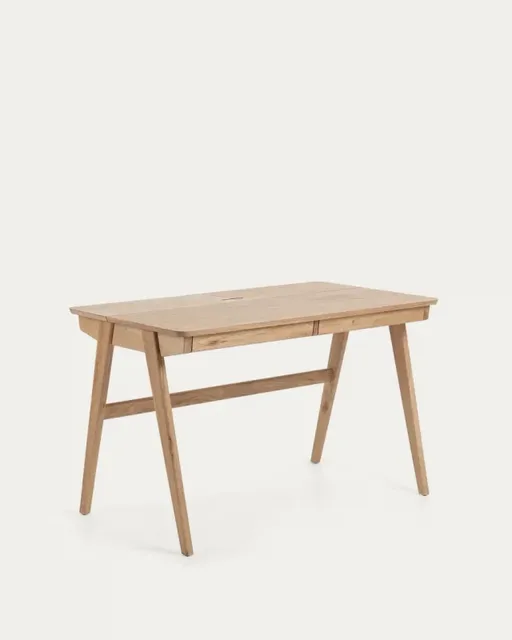
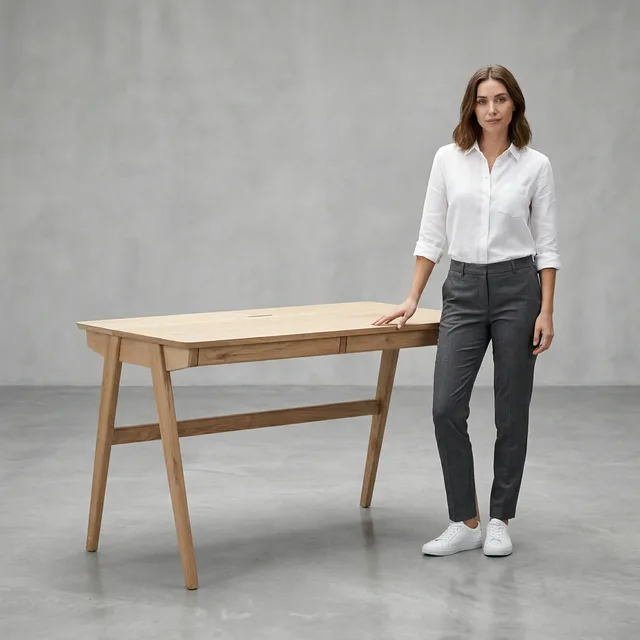
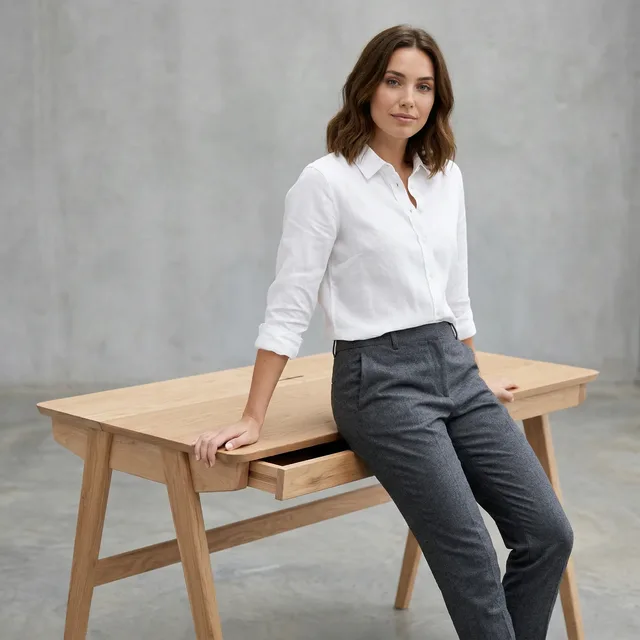


GreenOnion Product Photography example from our public gallery: one product photo in, four images out. These were not generated from the earring sentence above, and they show output, not the planning step. All four use the same grey studio and the same model, so the set reads as one shoot. Image 2 shows a drawer pulled open. Its interior was not in the input photo, so the AI drew it, and you should check it against your real desk. Image 3 crops the right end of the desk.
Strengths
- Type a word, a sentence, or nothing; the AI proposes several scene plans
- You can edit, skip, or accept each plan before spending credits on images
- Separate set-planning workflows for Amazon, A+, Etsy, and Shopify
- Libraries for AI models, backgrounds, and outfits
Limitations
- Higher cost per image than Pebblely for simple backgrounds
- Free results are watermarked previews; downloading needs a paid plan
- Expanded plans can add details you did not give; check them
- No self-serve API
See more AI product photography examples or try the AI product photography generator.
Other Pebblely alternatives: Pixelcut, Flair, and Canva
Pixelcut
Best all-round toolkitPrice: Pro $8/mo billed yearly ($10 shown as the other price), 600 AI credits, 1,000 batch exports a month, commercial license. Free plan exports without a watermark. Check current pricing →
Pixelcut's Product Studio “turns one upload into a full set of product photos”. It covers Studio, Lifestyle, and On Model formats, with output up to 4K. You can add custom prompt instructions and set the angle and background. Pixelcut is a better Pebblely alternative when you want cutouts, upscaling, and batch editing in the same subscription. The free plan's limits are described only as “limited”.
Flair
Best for art directionPrice: Free (5 images). Billed monthly: Pro $10/mo, Pro+ $35/mo (80 images), Scale $55/mo (150 images). With the annual discount: $8, $26, and $38 a month. A commercial license is listed from Pro+. Check current pricing →
Flair lets you “stage scenes digitally with drag & drop props”, and then the AI renders the result. Choose it over Pebblely when you want to place every prop yourself instead of picking a theme. Check the license: Flair lists the commercial license on Pro+ and above.
Canva
Best if you already use CanvaPrice: Pro $144/yr for one person. The background generator is not available on the Free plan; Pro offers a free trial. Check current pricing →
Canva Pro includes background generation and background removal alongside its design tools. It is a sensible Pebblely alternative if the same person also makes social posts and banners, though it is a general design tool, not a product-photo specialist.
Free Pebblely alternatives
Pebblely has no free trial, so a free way to test AI backgrounds means using another tool. These were the free options on November 7, 2026:
- Photoroom free plan: 100 exports a month (25 a week), for personal, non-commercial use only.
- Pixelcut free plan: limited background removal and upscaling, with exports free of watermarks. Which AI scene tools the free plan includes is not stated on the pricing page.
- Flair free plan: 5 generated images, no expiry.
- Claid free trial: 50 credits to use on any operation, enough for about 12 Standard Quality AI Photoshoot images.
- Canva: a free trial of Pro (length not stated). The Free plan does not include the background generator.
- GreenOnion: 20 free credits on sign-up (about 10 to 20 images, depending on the workflow). Free results are watermarked previews; downloading needs a paid plan.
GreenOnion's 20 credits are a trial allowance, not a free production plan. A small free allowance is useful for checking edge quality and label accuracy on one product, but not for judging a full month's workflow.
How to test Pebblely (or any alternative) before you commit
- Buy one month, not a year. With no trial, and a refund request possible only before you generate anything, Lite at $9 monthly is the lowest-risk test. Yearly billing saves money only after you know the output works for you.
- Use your hardest product. Pick one with small label text, a reflective or transparent surface, or a fine edge. Check the extracted label text before generating.
- Run the same scene in two tools. Use the same photo and the same short description in Pebblely and in one free alternative.
- Score what you would publish: product shape, label accuracy, edges, shadows, and whether the scene suits where the image will be used.
- Count credits honestly: include regenerations and any High-resolution images, which cost 2 credits each on Pebblely.
- Set a cancel reminder before the renewal date if the test fails, because renewal charges are non-refundable.
For Amazon main images, the background must be pure white and the image should show only the product being sold, whichever tool you use. Themed backgrounds belong in secondary images, on your own store, or on social media.
Turn a short idea into planned product scenes
Upload a product photo, add a word or a sentence of direction if you like, and edit or accept each proposed scene plan before you generate. New accounts start with 20 free credits.
Try the AI product photography generatorFrequently asked questions
Does Pebblely have a free trial?
No. The FAQ on Pebblely's pricing page answers "Can I get a free trial?" with "We do not offer free trials," and no free plan is listed. Pebblely's terms (last modified February 2024) still mention a free version, but the current pricing page does not offer one. Checked November 7, 2026.
How much does Pebblely cost per year?
Billed yearly, Lite is $90 a year (shown as $7.50 a month), Basic is $179 a year, and Pro is $379 a year. Billed monthly, the same plans are $9, $19, and $39 a month for 30, 200, and 500 images.
Can I get a refund from Pebblely?
Generally no. Pebblely's pricing FAQ says it cannot offer refunds, and renewal charges are non-refundable. Its terms add one exception: if you have not generated any images yet, you can email [email protected] to apply for a refund. Pebblely emails a reminder 7 days before renewal.
Can I use Pebblely images for my business?
Yes. Pebblely says you own the images you generate and can use them however you want. Its terms also say there is no guarantee the images do not infringe someone else's intellectual property, so you carry that risk. Pebblely says uploads and results are not used for AI training.
Do unused Pebblely image credits roll over?
No. Pebblely's pricing FAQ says unused image credits do not roll over to the next month. High-resolution mode also uses 2 credits per image instead of 1, so a 200-image plan gives about 100 high-resolution images.
What is the best Pebblely alternative?
GreenOnion is our pick if you want lifestyle scenes planned around your product without writing a prompt, or full Amazon, Etsy, and Shopify listing sets with infographics; it won the lifestyle round of our October 2026 side-by-side test. For background removal and editing, use Photoroom; for a low-cost all-rounder, Pixelcut; for catalogs and an API, Claid. We make GreenOnion.
Is Photoroom or Pebblely better for AI product backgrounds?
Photoroom is the better fit if you also need background removal, object removal, resizing, batch editing, or a free plan to start (free use is personal and non-commercial only). Pebblely is the simpler fit if you only want generated backgrounds from templates or a short prompt and prefer a fixed image count per month. We did not test Pebblely; Photoroom was in our one-bag Etsy test (see the GreenOnion section).
Vendor sources checked November 7, 2026
Plans, credits, and regional prices change. Verify the current vendor page before buying.
- Pebblely pricing (plans, yearly toggle, pricing FAQ)
- Pebblely FAQ
- How Pebblely works (guide)
- Pebblely terms of service
- Pebblely homepage
- Photoroom pricing
- Photoroom homepage (tools list)
- Photoroom: how to use AI Scenes
- Photoroom: is the app free? (commercial use)
- Photoroom: free plan export limit
- Pixelcut pricing
- Pixelcut AI product photos (Product Studio)
- Claid pricing (plans, billing toggle, FAQ)
- Claid homepage
- Flair pricing
- Flair homepage
- Canva pricing