
Quick answer: pick the tool by what you need
Lifestyle backgrounds planned around your product, without writing a prompt
Start with: GreenOnion Product Photography
Also consider: Pixelcut Product Studio
GreenOnion picks the scenes and plans several shots of your product, or expands a one-line idea if you give one; edit or skip plans, or accept them as-is. It won the lifestyle round of our October 2026 side-by-side test.
Trying a background generator for free
Start with: Pixelcut Free
Also consider: Adobe Express free plan, Claid 50-credit trial, Flair (5 images), GreenOnion (20 free credits, watermarked previews)
Pixelcut exports without a watermark; its commercial license is listed on Pro. Canva's generator is not on Canva Free.
Quick themed backgrounds on a small budget
Start with: Pebblely
Pick one of 40+ themes or write a custom prompt; Lite is $9 a month for 30 images.
Hundreds of SKUs, or backgrounds through an API
Start with: Claid
Also consider: Pixelcut (Batch and API)
Text or template backgrounds, batch on Pro, and a Generate Background API.
You already design everything in one general tool
Start with: Canva Pro
Also consider: Adobe Express / Firefly
Canva's BG Generator has two relight settings and sits next to your social and slide templates.
Arranging props yourself before the AI renders
Start with: Flair
A drag-and-drop canvas gives you direct control over layout and props.
| If you need… | Start with | Also consider | Why |
|---|---|---|---|
| Lifestyle backgrounds planned around your product, without writing a prompt | GreenOnion Product Photography | Pixelcut Product Studio | GreenOnion picks the scenes and plans several shots of your product, or expands a one-line idea if you give one; edit or skip plans, or accept them as-is. It won the lifestyle round of our October 2026 side-by-side test. |
| Trying a background generator for free | Pixelcut Free | Adobe Express free plan, Claid 50-credit trial, Flair (5 images), GreenOnion (20 free credits, watermarked previews) | Pixelcut exports without a watermark; its commercial license is listed on Pro. Canva's generator is not on Canva Free. |
| Quick themed backgrounds on a small budget | Pebblely | — | Pick one of 40+ themes or write a custom prompt; Lite is $9 a month for 30 images. |
| Hundreds of SKUs, or backgrounds through an API | Claid | Pixelcut (Batch and API) | Text or template backgrounds, batch on Pro, and a Generate Background API. |
| You already design everything in one general tool | Canva Pro | Adobe Express / Firefly | Canva's BG Generator has two relight settings and sits next to your social and slide templates. |
| Arranging props yourself before the AI renders | Flair | — | A drag-and-drop canvas gives you direct control over layout and props. |
Choose the tool that makes your product look at home in the scene and makes the scene worth wanting. The strongest result feels natural at first glance, supports the product's use case, and gives the shopper a reason to pause. Before publishing, compare the final product details with your original photo at full size.
Which AI background generator makes the most realistic product photos?
The most convincing product photo is not simply the one with the prettiest background. It is the one where the product, setting, light, scale, and mood all agree. In our October 2026 one-product test, GreenOnion produced the strongest planned lifestyle scene. It made the product feel part of a coherent, shoppable image rather than a cutout placed on top of a backdrop.
Swipe the table sideways to see all columns.
| What the shopper should feel | What the image needs | Why it matters |
|---|---|---|
| This product belongs here | A setting, surface, and props that fit the category and use case | The scene reinforces what the product is for |
| I can picture this in my life | A recognizable moment, room, routine, or aspiration | Context turns an object into something the shopper can want |
| It looks physically real | Believable contact shadow, weight, edges, and overlap | The product feels present in the scene instead of pasted on |
| The light makes sense | Highlights, shadow direction, and reflections shared by product and background | Consistent light is what makes the composite feel natural |
| The size feels right | Perspective and scale that agree with nearby objects | Buyers can understand the product without being distracted by a visual mismatch |
| This feels like one brand | A consistent palette, mood, and product treatment across the set | The listing looks intentional and campaign-ready |
Run the same product through two tools and ask a simple question first: which image would make the right customer stop and imagine owning it? Then inspect the winner at full size for product fidelity. The full side-by-side test shows how scene quality and product preservation work together.
Generic background generators vs tools built for product photos
A general AI image tool or design app treats your photo as a picture to restyle. A product-photo tool treats the product as something that must not change. For a seller, five things decide whether a tool is usable:
Swipe the table sideways to see all columns.
| What matters | Why it matters for sellers | What to look for |
|---|---|---|
| Product kept unchanged | Buyers return items that don't match the photo. Labels, logos and small print are where AI slips most. | A documented product-reference workflow such as Pixelcut Product Studio, plus your own check at full size. |
| Relighting and shadows | A pasted cutout with no matching light or contact shadow looks fake. | Relighting (Canva relight settings), generated shadows and reflections (Pebblely), or a separate AI Shadows tool (Claid). |
| White main image vs lifestyle scene | Amazon's main image needs a pure white background; scenes belong in secondary images, on Etsy, Shopify and ads. | Background removal for the main image; scene generation for the rest. |
| Batch | One product is a hobby; 200 SKUs is a workflow. | Batch editors (Pixelcut and Claid Pro), bulk generation (Pebblely Basic), or an API. |
| Free tier and commercial terms | A free image you cannot legally sell with is not free for a business. | Read the plan's license line, not just the price. |
Canva and Adobe Express are generic: they fit when you already design social posts and slides there. The remaining five tools in this comparison are built around product photos.
From what you type to the finished scene
Every tool here accepts some kind of instruction, but they ask for different things and help you in different ways. This table follows each documented workflow from your input to the image. It describes what the vendors document, not results from a side-by-side test.
Swipe the table sideways to see all columns.
| Tool | What you give it | What the tool adds | What you control |
|---|---|---|---|
| GreenOnion Product Photography | Optional creative direction (one word to as much as you like, or none), plus scene type (White Background, Studio, Indoor, Outdoor, Lifestyle), people on/off and prop count | Proposes several detailed scene plans, expanding your idea if you gave one | Edit, skip or accept each plan as-is; choose aspect ratio and which plans to generate |
| Pixelcut | A preset style (minimal studio, nature and more) or a typed description | Product Studio returns Studio, Lifestyle and On Model shots | Angle, background and custom prompt instructions; compare several variations |
| Pebblely | One of 40+ themes or a custom prompt | Adds shadows and reflections to match | Reference images on paid plans |
| Canva BG Generator | A text description of the background | Relights the photo (Balanced or Maximum relight) | Generate again with the same prompt; pick from results |
| Adobe Express | Remove background, then a stock background or the Generate image tool from text | Not stated on the feature page | Full Express editor |
| Claid | A text description, or Claid or your own templates | Generates the environment around the product you place on the canvas | Templates by product category; reuse your own backgrounds |
| Flair | Props and product arranged on a canvas | Renders the staged scene | You place every element yourself |
The practical difference: Pebblely, Canva, Claid and Pixelcut's Background Generator have you write or pick the scene for each generation. Pixelcut Product Studio is the exception among them: one upload returns a mix of Studio, Lifestyle and On Model shots. GreenOnion goes further by writing several detailed scene plans for you, from a short idea if you type one or from your scene settings if you don't; you can edit them or accept them as-is before generating. Flair asks the most of you, and gives the most direct control, because you compose the scene on a canvas.
Free tiers, entry prices and batch (checked October 11, 2026)
Swipe the table sideways to see all columns.
| Tool | Free option | Entry paid price | Batch / scale |
|---|---|---|---|
| GreenOnion | 20 free credits; free results are watermarked previews, and downloading needs a paid plan | $19/mo for 60 credits ($15.20/mo billed yearly); 1 credit = one 2K image | Several planned scenes per run; no self-serve API |
| Pixelcut | Exports without a watermark; background removal and upscale limited | Pro $8/mo billed yearly (600 AI credits, commercial license) | 1,000 batch exports/mo on Pro; API |
| Pebblely | None listed on the pricing page | Lite $9/mo for 30 images (monthly) | Bulk generation from Basic ($19/mo) |
| Canva | Background generator unavailable on Free | Pro $144/yr for one person | Usage cap: 200 images per 24 hours |
| Adobe Express | Marketed as a free background changer, no card required | Firefly Standard $9.99/mo (2,000 credits) | Not stated for this tool |
| Claid | 50 credits plus 50 API credits | Essentials $15/mo for 500 credits (help center) | Batch and API key on Pro ($49/mo) |
| Flair | 5 generated images | Pro $8/mo; commercial license from Pro+ $26/mo | API early access on Scale ($38/mo) |
Prices are in US dollars as shown on each vendor page. “Billed yearly” prices are the monthly equivalent of an annual plan. Pixelcut says yearly billing saves 20%. Pebblely's FAQ lists annual plans at $179 and $379 a year. Claid's plan prices come from its help center because the pricing page did not show them.
1. GreenOnion Product Photography
Our pick for lifestyle backgrounds without a promptPrice: $19/month for 60 credits ($15.20/month billed yearly), $49 for 180, $149 for 600; 20% off yearly. One credit makes one 2K image; a 4K image uses two. New accounts get 20 free credits; free results are watermarked previews, and downloading needs a paid plan.
Why it is our pick: GreenOnion does more than swap a backdrop. It plans several distinct scenes around the product, its category, and the way a shopper might use it—so the finished set feels natural, coordinated, and ready to build desire without making you write every prompt.
Tested: in our October 2026 side-by-side test of one handmade bag through several image workflows, GreenOnion won the lifestyle round without a written prompt: it chose a garden courtyard and kept every lifestyle shot in it. GreenOnion ran the test, and one product is one data point; watch the full test.
Backgrounds library: GreenOnion also keeps a reusable Backgrounds library, searchable by category, name or tag. You can add a background by uploading a photo with an instruction (for example, keep the room but remove an object in it) or by describing one for the AI to generate. The Fashion workflow lets you pick a background from this library, upload one, or generate one from a description.
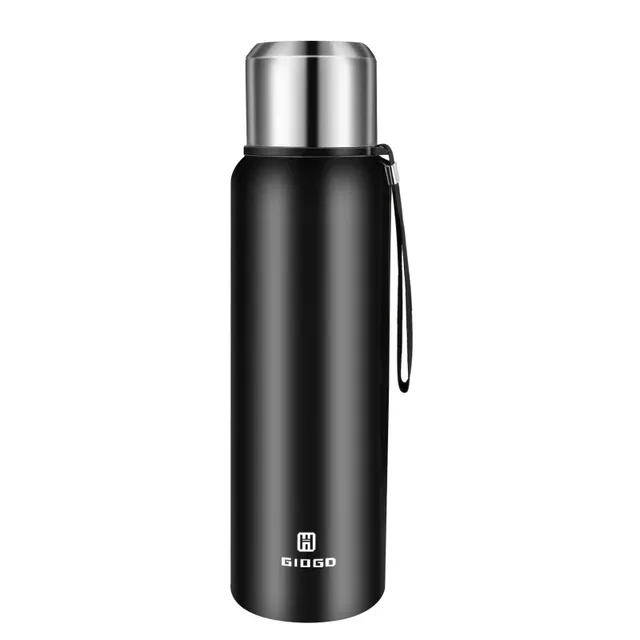




GreenOnion Product Photography example from our public gallery: one product photo in, four coordinated outdoor lifestyle scenes out. The set places the same bottle across recognizable active moments, with the strap and steel cap carried through.
How it works: Upload up to five product photos, choose whether people appear, select a scene direction (White Background, Studio, Indoor, Outdoor or Lifestyle), and set the prop count. Type nothing and GreenOnion proposes the scenes; give it one word or a full idea and it expands that direction into several editable plans. Keep, edit, or skip each plan, then choose the aspect ratio and images to generate.
Strengths
- Type a word, a sentence or nothing; the AI proposes scene plans you can edit or accept
- Several scenes for one product planned together, not one at a time
- Separate workflows for Amazon, Etsy, Shopify and fashion when you need a full listing set
- Reusable Backgrounds library you can fill by upload or description
Limitations
- Free results are watermarked previews and downloading needs a paid plan
- No self-serve API and no documented bulk run across many SKUs
- More than you need if you only want a quick background swap
Best for: sellers who want several lifestyle scenes for one product, planned together, without writing each prompt. Browse more AI product photography examples or try the AI product photography generator.
Final check: review small printed text and any plan-added facts before publishing. In this bottle example, the wordmark needs correction; in an earrings walkthrough, one proposed plan added a dimension that had not been supplied.
The other six tools, reviewed
2. Pixelcut (Background Generator and Product Studio)
Best low-cost all-rounderPrice: Pro $8/mo billed yearly (600 AI credits, commercial license); Business $24/mo billed yearly. Free plan exports without a watermark. Check current pricing →
How it works: The AI Background Generator takes a JPG, PNG or HEIC up to 50 MB and lets you type a scene or pick a preset style such as minimal studio or nature. Product Studio goes further: one upload returns Studio, Lifestyle and On Model shots at up to 4K, and Pixelcut says it “treats your uploaded product as the fixed part of the image.” You can set the angle and background, add custom prompt instructions, and compare variations.
Tradeoff: The free plan limits background removal and upscaling and does not list AI credits or a commercial license; those appear on Pro and Business. Free numeric limits are not stated on the pricing page.
Best for: small sellers who want one inexpensive tool for backgrounds, edits and bulk work (1,000 batch exports a month on Pro).
3. Pebblely
Best for quick themed backgroundsPrice: Lite $9/mo (30 images), Basic $19/mo (200), Pro $39/mo (500), billed monthly; annual plans $179 and $379 a year per the FAQ. No free plan on the pricing page. Check current pricing →
How it works: Upload a product, choose one of 40+ background themes or write a custom prompt. Pebblely's FAQ says the AI “adds shadows and reflections accordingly.” Basic and Pro add bulk generation. The FAQ says you own the images you generate.
Tradeoff: The pricing page and FAQ we checked describe choosing a theme or prompt per generation; we found no step that plans a set of scenes. Pebblely also says it does not offer refunds. Test with your own product before committing to an annual plan.
Best for: sellers with clean product photos who want attractive backgrounds quickly and cheaply.
4. Canva Background Generator
Best if you already design in CanvaPrice: Canva Pro $144/yr for one person; Business $250/yr per person. “Generate backgrounds for images” is unavailable on Canva Free. Check current pricing →
How it works: Select a photo, open BG Generator, describe the background and pick from the results. A Sun icon offers Balanced relight or Maximum relight. Canva caps use at backgrounds for 200 images every 24 hours.
Tradeoff: Canva's own help page warns that the generated background “may be more pixelated than the original background” and that light direction, color or style may not match. It is a general design tool, not a product-fidelity tool. Pro has a free trial, but Canva says the trial's AI allowance is the same as Canva Free.
Best for: sellers who make social posts, slides and product images in one place.
5. Adobe Express and Firefly
Best free generic option to tryPrice: Adobe Express markets a free background changer (“No credit card required”). Firefly Standard is $9.99/mo for 2,000 generative credits. Check current pricing →
How it works: Upload a JPEG, PNG or WebP up to 40 MB, remove the background, then choose a free background in the Express editor or create a new one from text with the Generate image tool. Paid Firefly plans include generative credits and Generative Fill.
Tradeoff: The feature page does not say how many credits generating a background uses, or state commercial-use terms. Like Canva, it is built for general design, so check product details closely.
Best for: trying a generated background at no cost, or sellers already paying for Adobe.
6. Claid (AI Backgrounds)
Best for catalogs and APIPrice: Essentials $15/mo for 500 credits, Pro $49/mo for 2,000 credits (help center). Free: 50 credits plus 50 API credits. Check current pricing →
How it works: AI Backgrounds can generate from text (you describe the environment, then place the product on the canvas) or start from templates: Claid's own mock-ups by product category, or your uploaded backgrounds saved as “My templates.” Separate tools add AI Shadows (2 credits) and background removal (1 credit). Batch processing and an API key come with Pro.
Tradeoff: Claid's help center does not list a credit cost for AI Backgrounds, and AI Photoshoot costs rise to 10 credits at 2K and 24 at 4K. It suits an operations team more than a seller with three products.
Best for: catalogs that need consistent backgrounds across many SKUs, or developers using the Generate Background API.
Pic Copilot is closing. A Service Closure Notice on Pic Copilot's pricing page says it stopped accepting payments from new users on September 27, 2026, and that the site and services close on December 7, 2026 at 23:59:59 (UTC+8), with active Pro subscriptions refunded. We no longer recommend it. Pixelcut covers similar background and batch-removal jobs.
7. Flair
Best for hands-on compositionPrice: Free (5 images), Pro $8/mo, Pro+ $26/mo (80 images), Scale $38/mo (150 images), billed monthly. Commercial license listed from Pro+. Check current pricing →
How it works: You “stage scenes digitally with drag & drop props,” add your own backgrounds and props, then let the AI render the scene. Templates let you reuse a setup.
Tradeoff: You make the composition decisions yourself, and the free plan is a five-image trial without a listed commercial license.
Best for: brands that want art direction over each campaign image.
Seller questions, answered
Which AI tools change product photo backgrounds for Amazon main images?
For the Amazon main image you need removal, not generation: a pure white background with only the product being sold. Pixelcut, Claid (1 credit per removal) and Canva Pro all remove backgrounds. GreenOnion's Product Photography has a White Background scene type, and its AI image editor shows a Remove BG tool; either way, check that the background is pure white and that no props were added. See our Amazon main image checklist. Generated scenes belong in the secondary images.
An Amazon listing usually needs both: one white-background main image and several secondary images (lifestyle scenes, infographics, size and detail shots). Background tools handle one image at a time. If you want the main image and the secondary images planned together, you can generate the whole Amazon image set from one product photo instead.
Is there a truly free AI background generator for product photos?
Pixelcut is the most usable free option in this comparison: its free plan exports without a watermark, though background removal is limited and the commercial license is listed on paid plans. Adobe Express advertises a free background changer with no card required. Claid gives 50 trial credits, GreenOnion 20 credits on sign-up (watermarked previews), and Flair five images. Canva's background generator is not available on Canva Free.
Will the AI change my product, logo or label?
It can, so check. Pixelcut Product Studio says it keeps the product fixed, while Canva warns that lighting or color may not match. In the GreenOnion bottle example above, the wordmark printed on the bottle was redrawn in all four outputs. Small text, fine logos, transparent glass and reflective metal are where every tool is most likely to slip.
What about Shopify and Etsy?
Neither requires a white main image, so lifestyle backgrounds can lead the listing. See our guides to AI backgrounds for Shopify listings and AI backgrounds for handmade Etsy products.
Is remove.bg still an option?
remove.bg only removes backgrounds; it does not generate new ones. Its FAQ says its background removal is moving into Canva and the standalone site will no longer be available from December 1, 2026. If you rely on it for white backgrounds, plan a replacement.
How to test two background generators before you pay
- Use your hardest product. Pick one with small printed text, a logo, a reflective or transparent surface, or a fine edge.
- Give both tools the same photo and the same request, for example “on a light oak kitchen counter with soft morning window light.”
- Check at full size: label and logo lettering, color, proportions, edges, contact shadow and light direction.
- Read the license line on the plan you would actually use for business.
- Count usable images, not generations: divide what you pay by the images you would publish.
Already have a clean white packshot and need only one scene? Start with Pixelcut. Need several different scenes for the same product and don't want to write each prompt? Try GreenOnion; new accounts start with 20 free credits. Need a white Amazon main image? You need background removal, not a generator.
Turn one product photo into several planned scenes
Upload a product photo, describe the scene in a word or a sentence if you like, and edit or accept each scene plan before you generate. New accounts start with 20 free credits.
Try the AI product photography generatorFrequently asked questions
What is the best AI background generator for product photos?
GreenOnion is our pick for product lifestyle backgrounds because it plans several scenes around what the product is, where it belongs, and how a shopper might use it—without requiring a prompt. It won the lifestyle round of our October 2026 side-by-side test. Pixelcut is a low-cost option for sellers who want to direct individual scenes, while Claid fits catalogs and API work. We make GreenOnion.
Is there a free AI background generator I can use for commercial product photos?
Check the license, not just the price. Pixelcut's free plan exports without a watermark, but its commercial license is listed on the paid plans. Canva's background generator is not available on Canva Free. Adobe Express markets its background changer as free with no credit card required but does not state commercial terms on that page. Claid's trial gives 50 credits. GreenOnion gives new accounts 20 free credits, but free results are watermarked previews and downloading needs a paid plan. Competitor terms checked October 11, 2026.
Can I use an AI-generated background on an Amazon main image?
Not a scene. Amazon's main image needs a pure white background and only the product being sold, so the job there is clean background removal, not background generation. Use generated scenes for the secondary images, and check that the product, label and color match what you ship.
Will an AI background generator change my product?
It can. Pixelcut says Product Studio keeps the uploaded product fixed, while Canva warns that light direction or color may not match. In the GreenOnion example on this page, the bottle's small printed wordmark was redrawn. Compare every output with the original at full size.
Which AI background generator makes the most realistic product photos?
GreenOnion is our pick when realism means the product belongs naturally in a suitable lifestyle scene, not just that the background looks photorealistic. In our October 2026 one-product test, it produced the strongest planned lifestyle result. Judge any output on scene fit, believable scale, contact shadows, lighting direction, product fidelity and consistency across the full set.
Is remove.bg an AI background generator?
No. remove.bg removes backgrounds; it does not generate new ones. Its FAQ says its background removal is moving into Canva and the standalone site will no longer be available from December 1, 2026.
Vendor sources checked October 11, 2026
Plans, credits, and regional prices change. Verify the current vendor page before buying.
- Pixelcut pricing
- Pixelcut AI Background Generator
- Pixelcut AI product photos (Product Studio)
- Pebblely pricing
- Pebblely FAQ
- Pebblely product-photo workflow
- Canva pricing
- Canva BG Generator help
- Adobe Express: change background
- Adobe Firefly plans
- Claid pricing
- Claid credits (help center)
- Claid AI background generation tools
- Pic Copilot pricing (Service Closure Notice banner)
- Pic Copilot AI Backgrounds
- Flair pricing
- Flair homepage (canvas)
- remove.bg FAQ (move to Canva)